
目次
はじめに
プラグイン「WP ULike」などを使わずに、「いいね」ボタンをエントリーカードとコメントに追加します。
この記事では、この方法について説明します。

完成イメージ
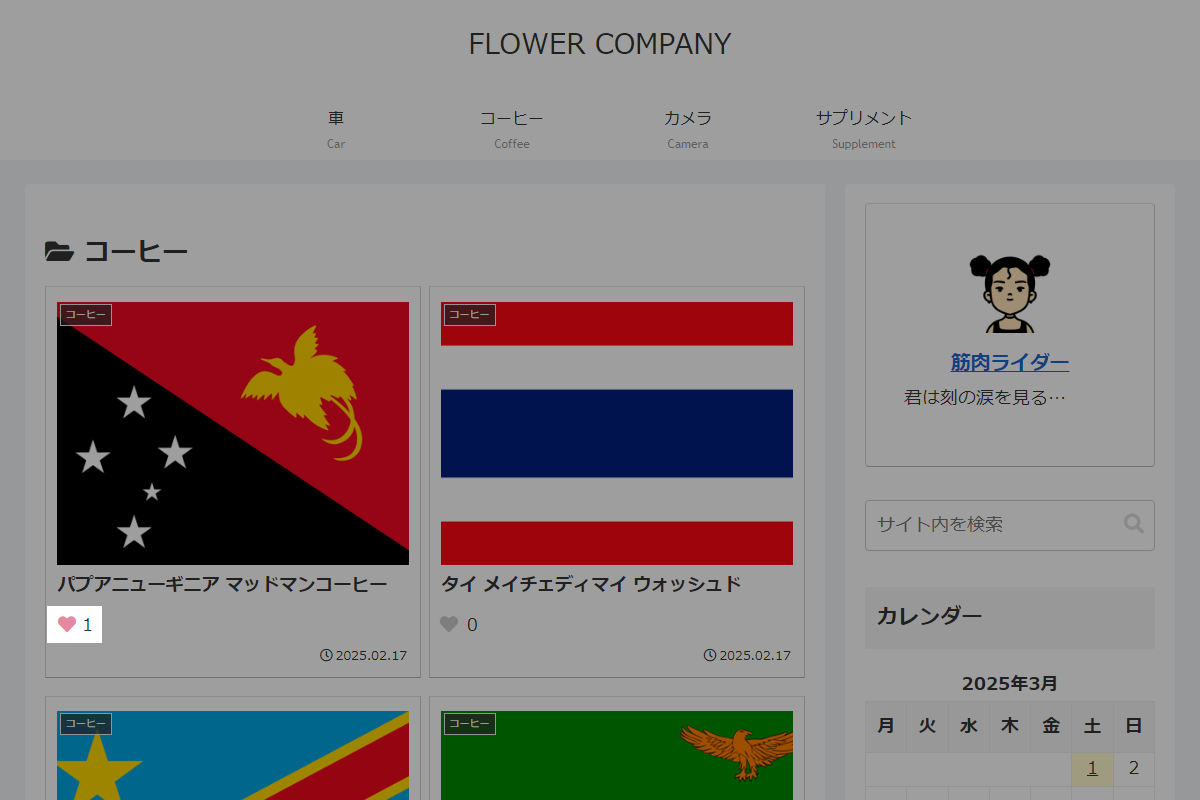

実装手順
以下の手順で実装します。
- ラベルPHPを追加(共通)
以下のコードをfunctions.phpに追加します。
/** * Ajaxコールバック関数 * * @return void */ if (!function_exists('like_callback')): function like_callback() { check_ajax_referer('like_action', 'like_nonce'); // POSTパラメータを取得 $type = $_POST['type'] ?? 'post'; $id = intval($_POST['id'] ?? 0); $mode = $_POST['mode'] ?? ''; $type = sanitize_text_field($type); $mode = sanitize_text_field($mode); $key = 'my_' . $type . '_like'; // 現在のいいね数を取得 $count = ($type === 'comment') ? intval(get_comment_meta($id, $key, true)) : intval(get_post_meta($id, $key, true)); // モードに応じてカウント数を増減 if ($mode === 'add') { $count++; } elseif ($mode === 'remove' && $count > 0) { $count--; } // カウント数を更新 if ($type === 'comment') { update_comment_meta($id, $key, $count); } else { update_post_meta($id, $key, $count); } // 更新情報をJSON形式で返却 wp_send_json_success(['count' => $count]); } endif; // フロント用JSとライブラリを追加 add_action('wp_enqueue_scripts', function () { wp_enqueue_script('jquery-cookie', 'https://cdnjs.cloudflare.com/ajax/libs/jquery-cookie/1.4.1/jquery.cookie.min.js', ['jquery'], '1.4.1', true); $ajax_url = esc_url(admin_url('admin-ajax.php')); $nonce = wp_create_nonce('like_action'); ob_start(); ?> jQuery(function ($) { /** * クッキーから保存済みのIDリストを取得 * * @param {string} type 対象の種別 * @return {Array<string>} 保存されているIDの配列 */ function getStoredIds(type) { var data = $.cookie('my_' + type + '_like'); return data ? JSON.parse(data).map(String) : []; } /** * ページ内の全ボタンの状態をクッキーと同期 * * @return {void} */ function syncAllButtonStates() { var likedPost = getStoredIds('post'); var likedComm = getStoredIds('comment'); $('.like').each(function () { var $like = $(this), type = $like.find('.like__button').data('type'), id = String($like.find('.like__button').data('id')), list = (type === 'post') ? likedPost : likedComm; $like.find('.like__button').toggleClass('is-active', list.indexOf(id) > -1); }); } // ページ読み込み時に実行 syncAllButtonStates(); $(document).on('click', '.like__button', function (e) { e.preventDefault(); var $btn = $(this), type = $btn.data('type'), id = String($btn.data('id')), list = getStoredIds(type), index = list.indexOf(id), mode = (index > -1) ? 'remove' : 'add'; if (mode === 'remove') { list.splice(index, 1); } else { list.push(id); } $.cookie('my_' + type + '_like', JSON.stringify(list), { expires: 7, path: '/' }); $('.like__button[data-id="' + id + '"]').each(function () { $(this).toggleClass('is-active', mode === 'add'); }); $.post('<?= $ajax_url; ?>', { action: 'like', type: type, id: id, mode: mode, like_nonce: '<?= $nonce; ?>' }, function (res) { if (res.success) { $('.like__button[data-id="' + id + '"]').siblings('.like__count').text(res.data.count); } }, 'json'); }); }); <?php wp_add_inline_script('jquery-cookie', ob_get_clean()); }); // Ajaxアクションを追加 add_action('wp_ajax_like', 'like_callback'); add_action('wp_ajax_nopriv_like', 'like_callback'); /** * いいねボタンを表示 * * @param int|null $post_id 対象のID * @param string $type 対象の種別 * @return void */ if (!function_exists('render_like')): function render_like($post_id = null, $type = 'post') { if (!$post_id) { $post_id = get_the_ID(); } $key = 'my_' . $type . '_like'; $count = ($type === 'comment') ? intval(get_comment_meta($post_id, $key, true)) : intval(get_post_meta($post_id, $key, true)); $output = '<div class="like">'; $output .= '<span class="like__button" data-type="' . esc_attr($type) . '" data-id="' . esc_attr($post_id) . '"></span>'; $output .= '<span class="like__count">' . $count . '</span>'; $output .= '</div>'; echo $output; } endif; - ラベルPHPを追加(エントリーカード)
以下のコードをfunctions.phpに追加します。
add_action('entry_card_snippet_after', function ($post_ID) { render_like($post_ID); }); - ラベルPHPを追加(コメント)
以下のコードをfunctions.phpに追加します。
add_filter('comment_text', function ($text, $comment) { if (is_admin()) { return $text; } ob_start(); render_like($comment->comment_ID, 'comment'); return $text . ob_get_clean(); }, 10, 2); - ラベルCSSを追加
以下のコードをstyle.cssに追加する。
.like__button {
  cursor: pointer;

  &::before {
    color: #ccc;
    content: '\f004';
    font-family: 'Font Awesome 5 Free';
    font-weight: 900;
    margin-right: 3px;
  }

  &.is-active::before {
    color: #e589a2;
  }
}
補足
表1に投稿とコメントの違いを示します。
| 項目 | 投稿 | コメント |
|---|---|---|
| ID | 投稿ID (post_ID) | コメントID (comment_ID) |
| 保存先 | post_meta | comment_meta |
| メタキー | ny_post_like | my_comment_like |
| 取得関数 | get_post_meta() | get_comment_meta() |
| 更新関数 | update_post_meta() | update_comment_meta() |
| Ajaxアクション | like_action | comment_like_action |
| クッキー | post_like | comment_like |