
はじめに
1つずつ編集画面を開いて親ページや順位を変更し直す必要があり、非常に手間がかかります。
そこで、プラグイン「Simple Page Ordering」などを使用せずに、固定ページをドラッグ&ドロップ操作だけで親子関係や並び替える機能を追加します。
この記事では、この方法について説明します。
完成イメージ
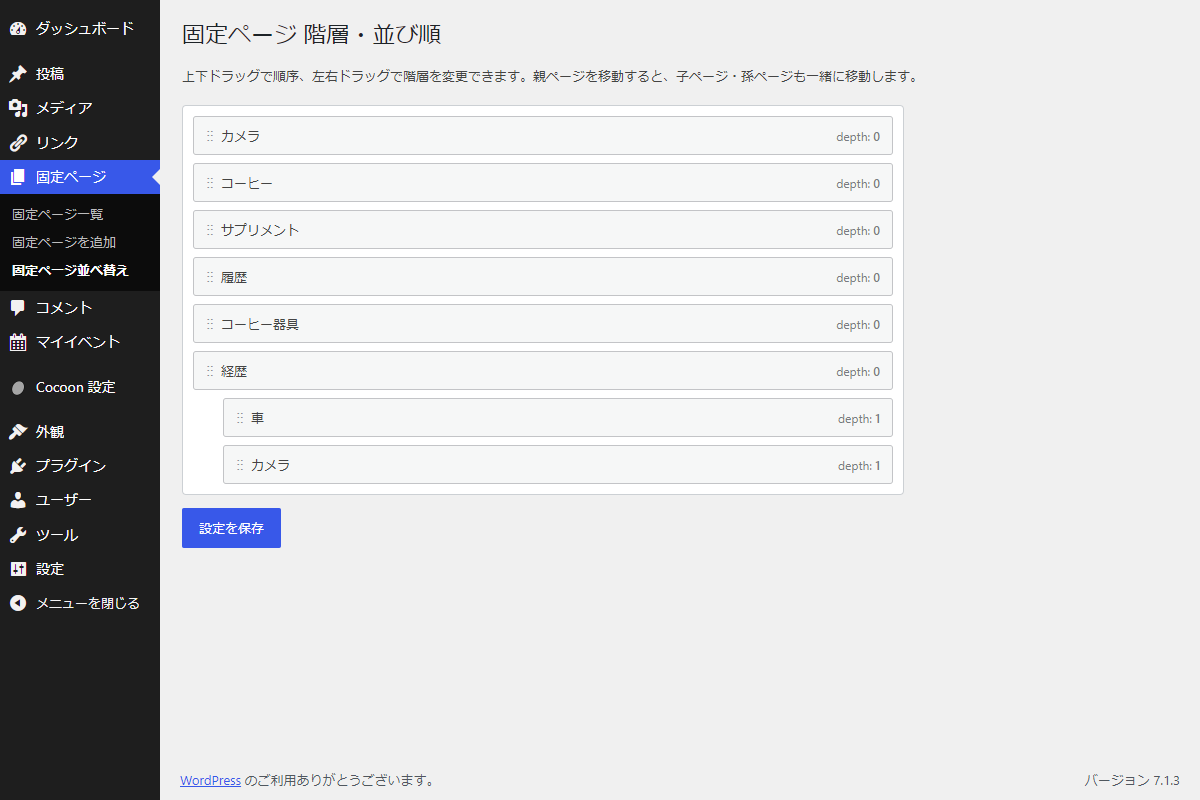
実装手順
以下のコードをfunctions.phpに追加します。
// 管理画面メニューを追加
add_action('admin_menu', function () {
  add_submenu_page(
    'edit.php?post_type=page',
    '固定ページ並べ替え',
    '固定ページ並べ替え',
    'edit_pages',
    'page_order',
    'render_page_order'
  );
});


/**
 * 管理画面ページを出力
 *
 * @return void
 */
if (!function_exists('render_page_order')):
function render_page_order() {
  // 固定ページ情報を取得
  $pages = get_pages([
    'post_status' => ['publish', 'draft', 'pending', 'private', 'future'],
    'sort_column' => 'menu_order, post_title',
    'hierarchical' => true,
  ]);

  // 取得エラー時は空配列を設定
  if (!is_array($pages)) {
    $pages = [];
  }

  // 親IDごとに固定ページを分類
  $map = [];

  // 親ページIDをキーにしてページ情報を登録
  foreach ($pages as $p) {
    $map[(int) $p->post_parent][] = $p;
  }

  // 同じ親を持つページを menu_order、タイトル順に並び替え
  foreach ($map as &$siblings) {
    usort($siblings, function ($a, $b) {
      $result = (int) $a->menu_order <=> (int) $b->menu_order;

      return $result !== 0
        ? $result
        : strcmp($a->post_title, $b->post_title);
    });
  }
  unset($siblings);

  ?>
  <div class="wrap">
    <h1>固定ページ 階層・並び順</h1>
    <p>上下ドラッグで順序、左右ドラッグで階層を変更できます。親ページを移動すると、子ページ・孫ページも一緒に移動します。</p>

    <ul id="page-order-list">
      <?php
      // 印刷済みフラグを初期化
      $printed = [];

      // 親の直後に子孫を再帰的に表示する処理を設定
      $print = function ($parent_id, $depth) use (&$print, &$printed, $map) {
        // 指定された親IDに属するページを取得
        foreach ($map[$parent_id] ?? [] as $p) {
          $id = (int) $p->ID;

          if (isset($printed[$id])) {
            continue;
          }

          // 印刷済みとして登録
          $printed[$id] = true;

          // タイトルを取得
          $title = get_the_title($p);
          if ($title === '') {
            $title = '(タイトルなし)';
          }

          // ステータスを設定
          $status = $p->post_status !== 'publish'
            ? ' (' . $p->post_status . ')'
            : '';

          $term_id = (int) $id;
          $depth_val = (int) $depth;
          $margin_left = $depth_val * 30;
          $display_title = esc_html($title . $status);

          echo '<li data-id="' . $term_id . '" data-depth="' . $depth_val . '" style="margin-left:' . $margin_left . 'px">';
          echo '<span class="page-order__grip" aria-hidden="true">⋮⋮</span>';
          echo '<span class="page-order__title">' . $display_title . '</span>';
          echo '<small class="page-order__depth">depth: <b>' . $depth_val . '</b></small>';
          echo '</li>';

          // 子ページを次の階層で表示する処理を設定
          $print($id, $depth + 1);
        }
      };

      // 最上位ページを表示
      $print(0, 0);

      // 親ページが取得対象に含まれない場合も残りを表示
      foreach ($pages as $p) {
        $id = (int) $p->ID;

        if (!isset($printed[$id])) {
          // 残りのページを印刷済みとして登録
          $printed[$id] = true;

          $title = get_the_title($p) ?: '(タイトルなし)';
          $status = $p->post_status !== 'publish' ? ' (' . $p->post_status . ')' : '';
          $display_title = esc_html($title . $status);

          echo '<li data-id="' . $id . '" data-depth="0" style="margin-left:0">';
          echo '<span class="page-order__grip" aria-hidden="true">⋮⋮</span>';
          echo '<span class="page-order__title">' . $display_title . '</span>';
          echo '<small class="page-order__depth">depth: <b>0</b></small>';
          echo '</li>';

          // 残りの子ページを表示
          $print($id, 1);
        }
      }
      ?>
    </ul>

    <p>
      <button type="button" id="page-order-save" class="button button-primary">設定を保存</button>
      <span id="page-order-msg" role="status"></span>
    </p>
  </div>
  <?php
}
endif;


// 管理画面用JS・CSSを追加
add_action('admin_enqueue_scripts', function () {
  if (($_GET['page'] ?? '') !== 'page_order') {
    return;
  }

  ob_start();
  ?>
  #page-order-list {
    background-color: #fff;
    border: 1px solid #ccd0d4;
    border-radius: 4px;
    list-style: none;
    margin-top: 20px;
    max-width: 700px;
    padding: 10px;
  }

  #page-order-list li {
    align-items: center;
    background-color: #f6f7f7;
    border: 1px solid #c3c4c7;
    border-radius: 3px;
    box-sizing: border-box;
    cursor: move;
    display: flex;
    font-weight: bold;
    margin-bottom: 8px;
    min-height: 39px;
    padding: 8px 12px;
  }

  #page-order-list li:last-child {
    margin-bottom: 0;
  }

  #page-order-list li:hover {
    background-color: #f0f0f1;
  }

  .page-order__grip {
    color: #8c8f94;
    flex-shrink: 0;
    font-weight: normal;
    letter-spacing: -1px;
    margin-right: 8px;
    user-select: none;
  }

  .page-order__title {
    font-weight: normal;
    overflow-wrap: anywhere;
  }

  .page-order__depth {
    color: #787c82;
    flex-shrink: 0;
    font-size: 12px;
    font-weight: normal;
    margin-left: auto;
    padding-left: 12px;
  }

  #page-order-list li.page-order__placeholder {
    background-color: #e5f5fa;
    border: 1px dashed #2271b1;
    border-radius: 3px;
    box-sizing: border-box;
    height: 39px;
    margin-bottom: 8px;
    padding: 0;
  }

  #page-order-list li.ui-sortable-helper {
    background-color: #fff;
    box-shadow: 0 2px 8px rgba(0, 0, 0, .2);
  }
  <?php
  wp_add_inline_style('wp-admin', ob_get_clean());

  ob_start();
  ?>
  jQuery(function ($) {
    // ドラッグ幅・対象リスト・移動情報・子ページを設定
    var I = 30, $l = $("#page-order-list"), x0, d0, C = $();

    // 固定ページの階層を取得
    var D = function ($i) {
      return +$i.attr("data-depth") || 0;
    };

    // 固定ページの階層と表示位置を変更
    var S = function ($i, d) {
      $i.attr("data-depth", d).css("margin-left", d * I);
      $i.find("b").text(d);
    };

    // 固定ページリストのドラッグ操作を設定
    $l.sortable({
      // ドラッグ中のプレースホルダーと判定方法を設定
      placeholder: "page-order__placeholder",
      tolerance: "pointer",

      // ドラッグ開始時の階層と子ページを取得
      start: function (e, ui) {
        // ドラッグ開始位置と対象ページの階層を取得
        x0 = e.pageX;
        d0 = D(ui.item);

        // 移動対象の子ページを初期化
        C = $();

        // 対象ページに属する子孫ページを取得
        ui.item.nextAll("li").not(ui.placeholder).each(function () {
          // 同じ階層以下のページで取得を終了
          if (D($(this)) <= d0) return false;

          // 移動対象の子孫ページを登録
          C = C.add(this);
        });

        // 子孫ページを一時的にリストから切り離す
        C.detach();

        // ドラッグ位置の再計算を設定
        $l.sortable("refreshPositions");
      },

      // ドラッグ中の移動先階層を変更
      sort: function (e, ui) {
        // プレースホルダーの直前にあるページを取得
        var p = ui.placeholder.prevAll("li").not(ui.item).first();

        // 横方向の移動量から階層を計算して変更
        var d = Math.max(0, Math.min(d0 + Math.round((e.pageX - x0) / I), p.length ? D(p) + 1 : 0));

        // 移動先の階層を一時保存
        ui.item.data("nd", d);

        // プレースホルダーの表示位置を変更
        ui.placeholder.css("margin-left", d * I);
      },

      // ドラッグ終了時に階層と子ページの位置を変更
      stop: function (e, ui) {
        // 移動先の直前にあるページを取得
        var p = ui.item.prev();

        // ドラッグ中に設定した階層を取得
        var d = ui.item.data("nd");

        // 移動先の階層を有効な範囲に変更
        d = Math.max(0, Math.min(d === undefined ? d0 : d, p.length ? D(p) + 1 : 0));

        // 移動したページの階層を変更
        S(ui.item, d);

        // 子孫ページの階層を親ページに合わせて変更
        C.each(function () {
          S($(this), D($(this)) + d - d0);
        });

        // 子孫ページを親ページの後ろに登録
        ui.item.after(C);

        // 子孫ページの一時情報を初期化
        C = $();

        // 階層の連続性を確認するための初期値を設定
        var prev = -1;

        // 各ページの階層を確認して変更
        $l.children().each(function () {
          // 直前のページより深い階層になりすぎないように変更
          var n = Math.min(D($(this)), prev + 1);

          // 必要な場合は階層を変更
          if (n !== D($(this))) {
            S($(this), n);
          }

          // 次のページの比較用階層を設定
          prev = n;
        });
      }
    });

    // 保存ボタンのクリック処理を設定
    $("#page-order-save").on("click", function () {
      // 親ページ情報と保存対象を初期化
      var s = [], items = [];

      // 画面上の順序からページIDと親IDを取得
      $l.children().each(function () {
        // 現在の階層とページIDを取得
        var d = Math.min(D($(this)), s.length);
        var id = $(this).data("id");

        // 現在の階層に合わせて親情報を設定
        s.length = d;

        // ページIDと親ページIDを登録
        items.push([id, s[d - 1] || 0]);

        // 次のページの親情報としてページIDを登録
        s.push(id);
      });

      // AJAXで保存処理を実行
      $.post(ajaxurl, {
        // 保存処理のアクションを設定
        action: "page_order_save",

        // 固定ページ情報をJSON形式で登録
        items: JSON.stringify(items)
      })
      .done(function (r) {
        // 保存成功時は画面を再読み込み
        if (r.success) {
          location.reload();
        } else {
          // 保存失敗時のメッセージを設定
          $("#page-order-msg").text("保存に失敗しました。");
        }
      })
      .fail(function () {
        // 通信失敗時のメッセージを設定
        $("#page-order-msg").text("通信エラー");
      });
    });
  });
  <?php

  wp_enqueue_script('jquery-ui-sortable');
  wp_add_inline_script('jquery-ui-sortable', ob_get_clean());
});


// Ajaxアクションを追加
add_action('wp_ajax_page_order_save', function () {
  // 保存権限がない場合は処理対象外
  if (!current_user_can('edit_pages')) {
    wp_send_json_error(['message' => '保存する権限がありません。']);
  }

  // 送信された固定ページ情報をJSONから取得
  $items = json_decode(wp_unslash($_POST['items'] ?? ''), true);

  // 配列形式でない場合は処理対象外
  if (!is_array($items)) {
    wp_send_json_error(['message' => '送信データが正しくありません。']);
  }

  $valid = [];
  $seen = [];
  $err = 0;

  // ページID・親IDを検証
  foreach (array_values($items) as $order => $item) {
    if (!is_array($item) || !isset($item[0])) {
      $err++;
      continue;
    }

    $id = absint($item[0]);
    $parent = isset($item[1]) ? absint($item[1]) : 0;

    if (!$id || isset($seen[$id])) {
      $err++;
      continue;
    }

    // 投稿情報を取得
    $post = get_post($id);

    if (
      !$post ||
      $post->post_type !== 'page' ||
      !current_user_can('edit_post', $id)
    ) {
      $err++;
      continue;
    }

    if ($parent) {
      // 親の投稿情報を取得
      $parent_post = get_post($parent);

      if (
        !$parent_post ||
        $parent_post->post_type !== 'page' ||
        !current_user_can('edit_post', $parent)
      ) {
        $err++;
        continue;
      }
    }

    // 閲覧済みとして登録
    $seen[$id] = true;

    // 有効なデータを登録
    $valid[$id] = [
      'id' => $id,
      'parent' => $parent,
      'order' => $order,
    ];
  }

  // 送信された階層内で循環参照を検出
  foreach ($valid as $id => &$row) {
    $parent = $row['parent'];
    $chain = [$id => true];
    $steps = 0;

    while ($parent) {
      if (isset($chain[$parent])) {
        $row['parent'] = 0;
        $err++;
        break;
      }

      $chain[$parent] = true;

      // 一覧に含まれない親は既存の親子関係をたどる
      if (isset($valid[$parent])) {
        $parent = $valid[$parent]['parent'];
      } else {
        // 親の投稿情報を取得
        $parent_post = get_post($parent);

        if (!$parent_post || $parent_post->post_type !== 'page') {
          $row['parent'] = 0;
          $err++;
          break;
        }

        $parent = (int) $parent_post->post_parent;
      }

      if (++$steps > count($valid) + 100) {
        $row['parent'] = 0;
        $err++;
        break;
      }
    }
  }
  unset($row);

  // 親IDと menu_order を保存
  $updated = 0;

  foreach ($valid as $row) {
    $id = $row['id'];
    $parent = $row['parent'];
    $order = $row['order'];
    // 投稿情報を取得
    $post = get_post($id);

    if (
      (int) $post->post_parent === $parent &&
      (int) $post->menu_order === $order
    ) {
      continue;
    }

    // 投稿情報を変更して保存
    $result = wp_update_post([
      'ID' => $id,
      'post_parent' => $parent,
      'menu_order' => $order,
    ], true);

    if (is_wp_error($result) || !$result) {
      $err++;
    } else {
      $updated++;
    }
  }

  // 投稿キャッシュをクリアして終了
  clean_post_cache(array_keys($valid));

  // 保存結果の通知内容を設定
  set_transient('page_order_admin_notice', [
    'type' => !$err ? 'success' : 'warning',
    'message' => !$err ? '設定を保存しました。' : '一部の固定ページを保存できませんでした。',
  ], 30);

  // 更新件数とエラー件数をJSON形式で返却して処理を終了
  wp_send_json_success(['n' => $updated, 'err' => $err]);
});


// 通知メッセージを出力
add_action('admin_notices', function () {
  if ($notice = get_transient('page_order_admin_notice')) {
    echo '<div class="notice notice-' . esc_attr($notice['type']) . ' is-dismissible"><p>' . esc_html($notice['message']) . '</p></div>';
    delete_transient('page_order_admin_notice');
  }
});


// 固定ページウィジェットの並び順をmenu_orderに変更
add_filter('widget_pages_args', function ($args) {
  $args['sort_column'] = 'menu_order, post_title';
  return $args;
});
さいごに
今回紹介した方法を使えば、プラグインを使わずに、管理画面の固定ページ一覧を自由にドラッグで並び替えることができます。
ぜひ自作テーマやカスタマイズにお役立てください。
