はじめに
Cocoonでは、投稿ページと一覧ページで、ナビゲーションの左右が持つ「時系列の意味(新旧)」が異なっているという仕様上の課題があります。
サイト全体の操作性を向上させるためには、どのページにいてもユーザーが迷わないよう「左=新しい(未来・前へ)」「右=古い(過去・次へ)」という統一した方向軸に揃えることが重要です。
そこで、一覧ページのページネーションに合わせて投稿ページのページ送りナビの方向を統一します。
さらに、標準では投稿ページでしか機能しないモバイルボタンの「#prev」「#next」ボタンを、一覧ページでも使えるように拡張します。
この記事では、この方法について説明します。
問題点
従来のCocoon標準のページ送りナビには、大きく分けて2つの問題点が存在します。
「prev」と「next」が指す時系列の食い違い
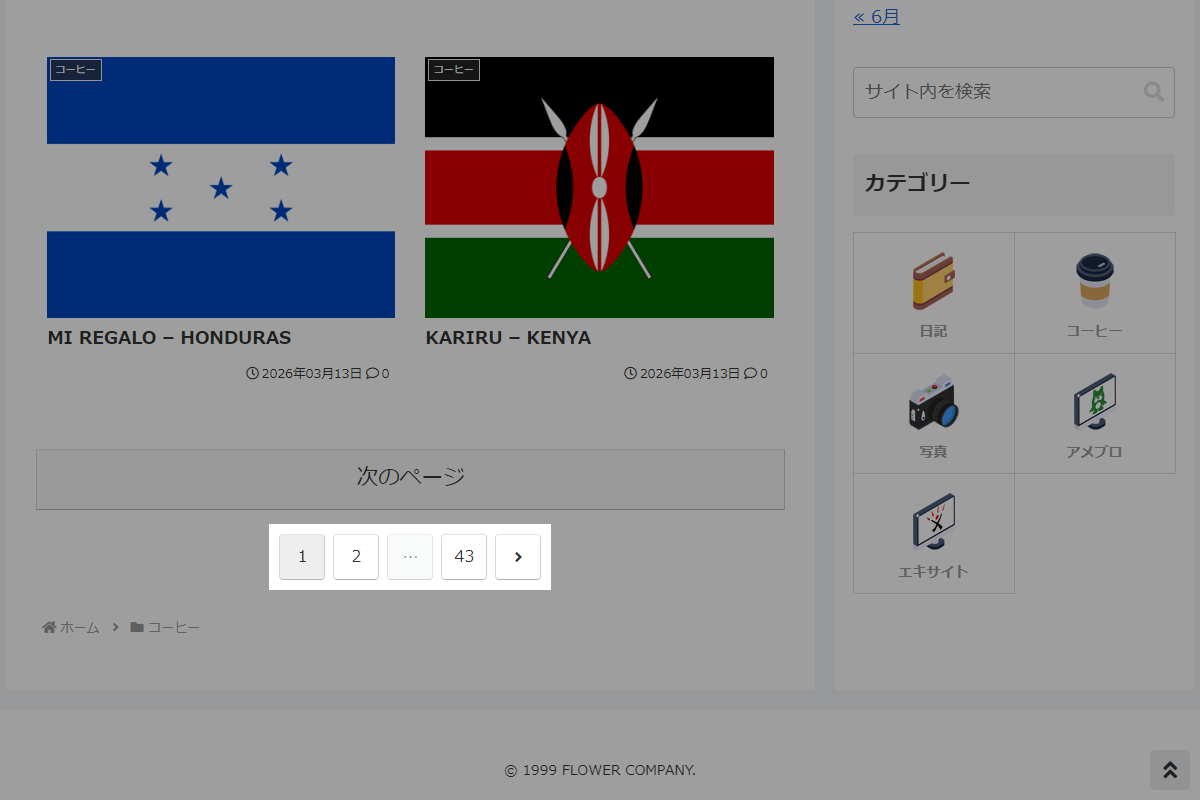
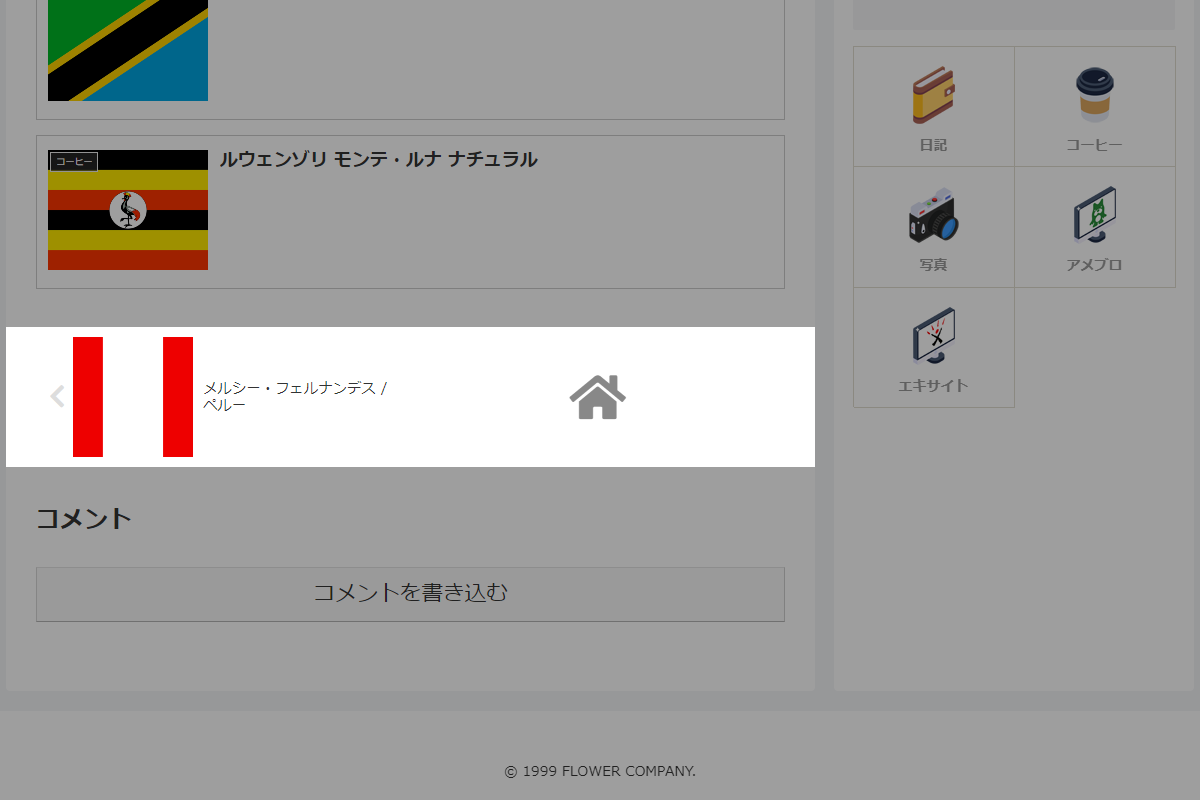
ページの種類によって「prev」と「next」ボタンが指す時系列の方向(新旧)が真逆になっています。
| ページの種類 | 左側(prev) | 右側(next) |
|---|---|---|
| 一覧ページ (ページネーション) | 新しいページ(前へ戻る) | 古いページ(次へ進む) |
| 投稿ページ (ページ送りナビ) | 古い記事(過去へ遡る) | 新しい記事(未来へ進む) |
このように、一覧ページでは「左=新しい」、投稿ページでは「左=古い」と軸がズレてしまっていたため、全てのページで「左=新しい / 右=古い」に方向性を統一します。
例えば、WordPress公式ドキュメントにおけるprevious_posts_linkの説明にも、「通常の投稿クエリでは、新しいエントリを指す」と明記されています。
以下の記事では、CSSを用いて見た目上の並び順だけを左右反転させる方法を紹介しています。
一方、この記事ではPHPを使ってHTMLの構造そのものを反転させます。

モバイルボタンの表示制限
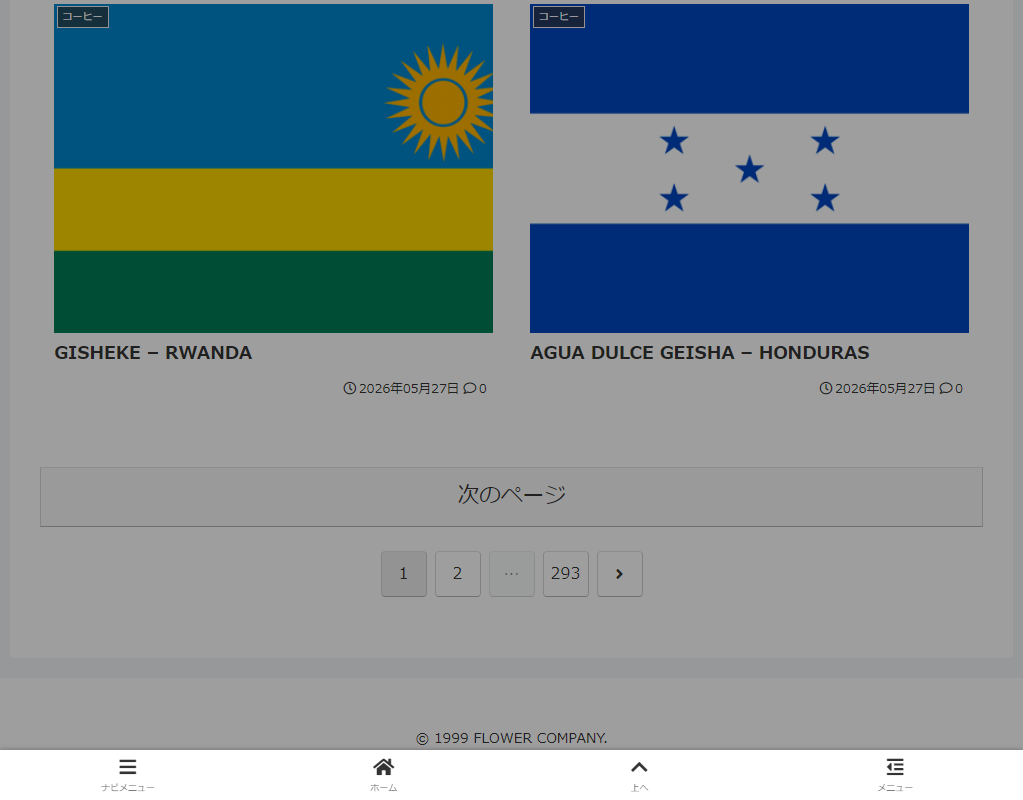
標準のモバイルボタンにある「#prev」「#next」ボタンは、投稿ページでの利用を前提としており、一覧・アーカイブページでは表示されません。
完成イメージ
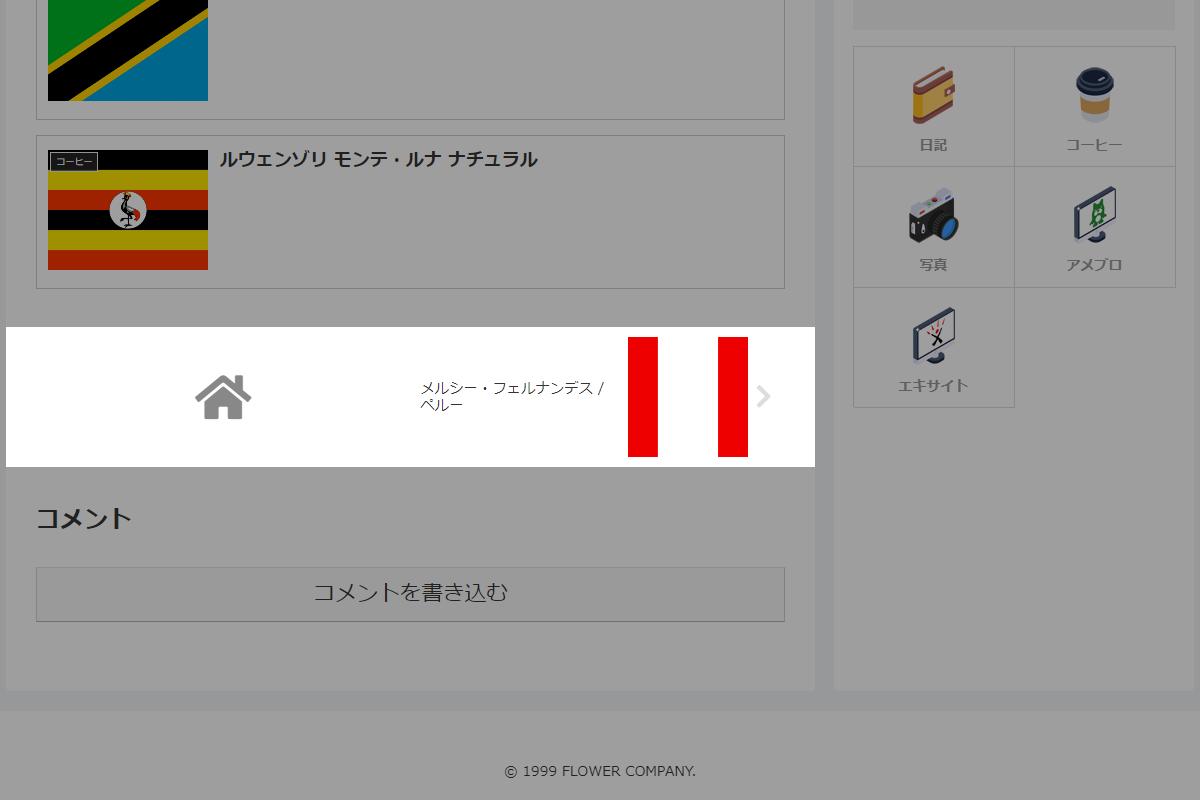
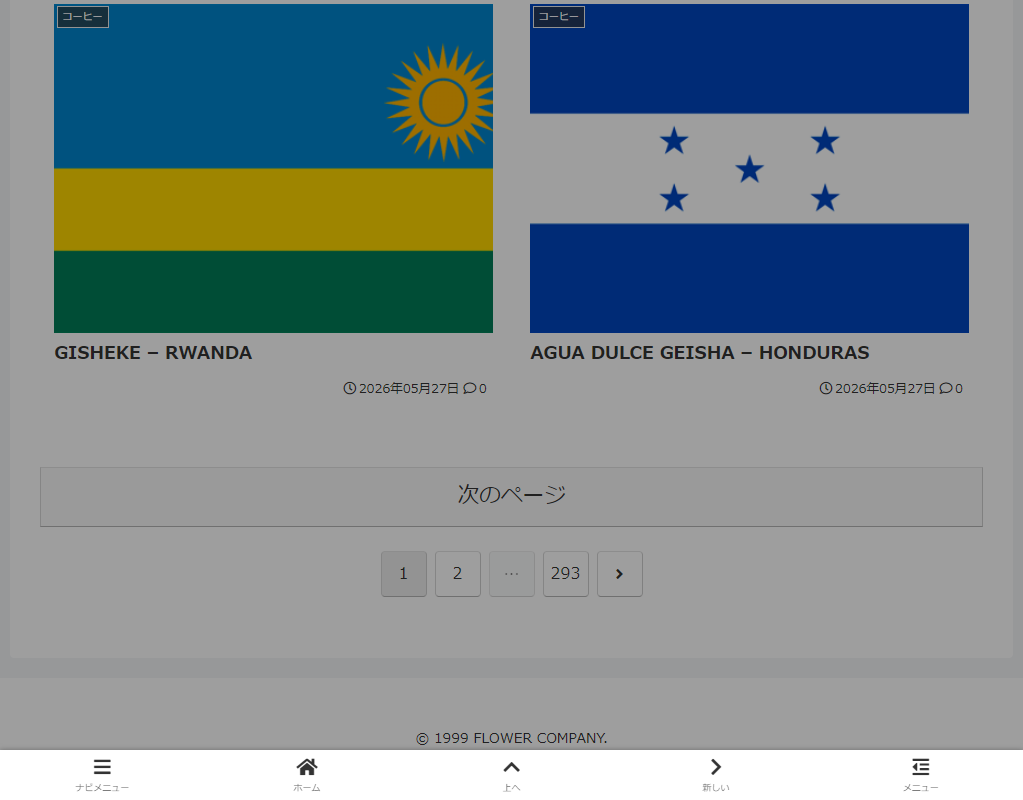
実装コード
以下の手順で実装します。
- ラベルPHPを追加
以下のコードをfunctions.phpに追加します。
/** * モバイルナビボタンHTMLを生成 * * @param string $direction prevまたはnext * @return string 生成されたHTML */ if (!function_exists('get_custom_mobile_nav_button_html')) : function get_custom_mobile_nav_button_html($direction) { $target_url = ''; $title_attr = ''; $is_prev = ($direction === 'prev'); if (is_single()) { // 投稿ページ $in_same_term = is_post_navi_same_category_enable(); $get_previous = $is_prev ? false : true; $post_obj = get_adjacent_post($in_same_term, '', $get_previous); if ($post_obj) { $target_url = get_permalink($post_obj->ID); $title_attr = wp_strip_all_tags(get_the_title($post_obj->ID)); } } else { // 一覧・アーカイブページ global $wp_query; $paged = get_query_var('paged') ? get_query_var('paged') : 1; $max_page = !empty($wp_query->max_num_pages) ? $wp_query->max_num_pages : 1; if ($is_prev) { if ($paged > 1) { $target_url = get_pagenum_link($paged - 1); } } else { if ($paged < $max_page) { $target_url = get_pagenum_link($paged + 1); } } } // 遷移先URLを確認 if (!$target_url) { return ''; } global $_MENU_CAPTION, $_MENU_ICON; $default_icon = $is_prev ? 'fa fa-arrow-left' : 'fa fa-arrow-right'; $default_caption = $is_prev ? __('前へ', THEME_NAME) : __('次へ', THEME_NAME); $icon_class = $_MENU_ICON ? $_MENU_ICON : $default_icon; $caption_text = $_MENU_CAPTION ? $_MENU_CAPTION : $default_caption; $button_class = $is_prev ? 'prev' : 'next'; ob_start(); ?> <li class="<?= esc_attr($button_class) ?>-menu-button menu-button menu-button-<?= esc_attr($button_class) ?>"> <a href="<?= esc_url($target_url) ?>"<?= $title_attr ? ' title="' . esc_attr($title_attr) . '"' : '' ?> class="menu-button-in"> <span class="<?= esc_attr($button_class) ?>-menu-icon menu-icon"> <span class="<?= esc_attr($icon_class) ?>" aria-hidden="true"></span> </span> <span class="<?= esc_attr($button_class) ?>-menu-caption menu-caption"><?= esc_html($caption_text) ?></span> </a> </li> <?php return ob_get_clean(); } endif; // テンプレート(モバイルメニュー前へボタン)を変更 add_filter('cocoon_part__tmp/mobile-prev-button', function ($content, $name, $args) { return get_custom_mobile_nav_button_html('prev'); }, 10, 3); // テンプレート(モバイルメニュー次へボタン)を変更 add_filter('cocoon_part__tmp/mobile-next-button', function ($content, $name, $args) { return get_custom_mobile_nav_button_html('next'); }, 10, 3); // テンプレート(ページ送りナビ)を変更 add_filter('cocoon_part__tmp/pager-post-navi', function ($content, $name, $args) { // 表示設定を確認 if (!is_post_navi_visible()) { return ''; } // カテゴリー設定・タクソノミー情報を取得 $in_same_term = is_post_navi_same_category_enable(); $excluded_terms = sanitize_array(get_post_navi_exclude_category_ids()); $taxonomy = 'category'; $post_type = get_post_type(); if ($post_type) { $taxonomies = get_object_taxonomies($post_type); if ($taxonomies && isset($taxonomies[0])) { $taxonomy = $taxonomies[0]; } } // 前後の記事を取得 $left_post = get_adjacent_post($in_same_term, $excluded_terms, false, apply_filters('post_navi_taxonomy', $taxonomy)); $right_post = get_adjacent_post($in_same_term, $excluded_terms, true, apply_filters('post_navi_taxonomy', $taxonomy)); // アイキャッチ画像サイズを設定 $width = THUMB120WIDTH; $height = THUMB120HEIGHT; switch (get_post_navi_type()) { case 'square': $width = THUMB150WIDTH; $height = THUMB150HEIGHT; break; } // 前後の記事を確認 if (!$left_post && !$right_post) { return ''; } ob_start(); ?> <div id="pager-post-navi" class="pager-post-navi<?= get_additional_post_navi_classes() ?> cf"> <?php if ($left_post): ?> <a href="<?= esc_url(get_permalink($left_post->ID)) ?>" title="<?= esc_attr(wp_strip_all_tags(get_the_title($left_post->ID))) ?>" class="prev-post a-wrap border-element cf"> <div class="fa fa-chevron-left iconfont" aria-hidden="true"></div> <figure class="prev-post-thumb card-thumb"> <?= get_post_navi_thumbnail_tag($left_post->ID, $width, $height) ?> </figure> <div class="prev-post-title"><?= get_the_title($left_post->ID) ?></div> </a> <?php elseif (is_post_navi_type_spuare()): ?> <a href="<?= esc_url(home_url('/')) ?>" id="prev-next-home" class="prev-next-home a-wrap"> <span class="fa fa-home" aria-hidden="true"></span> </a> <?php endif; ?> <?php if ($right_post): ?> <a href="<?= esc_url(get_permalink($right_post->ID)) ?>" title="<?= esc_attr(wp_strip_all_tags(get_the_title($right_post->ID))) ?>" class="next-post a-wrap cf"> <div class="fa fa-chevron-right iconfont" aria-hidden="true"></div> <figure class="next-post-thumb card-thumb"> <?= get_post_navi_thumbnail_tag($right_post->ID, $width, $height) ?> </figure> <div class="next-post-title"><?= get_the_title($right_post->ID) ?></div> </a> <?php elseif (is_post_navi_type_spuare()): ?> <a href="<?= esc_url(home_url('/')) ?>" id="prev-next-home" class="prev-next-home a-wrap"> <span class="fa fa-home" aria-hidden="true"></span> </a> <?php endif; ?> </div> <?php return ob_get_clean(); }, 10, 3); - ラベルCSSを追加
以下のコードをstyle.cssに追加します。
.body:has(.front-page-type-tab-index #index-tab-1:not(:checked)) :is(.menu-button-prev, .menu-button-next),
.body:has([class*="front-page-type-category"]) :is(.menu-button-prev, .menu-button-next) {
  display: none !important;
}
参考:ページ送りボタンに「新しい」「古い」のラベルを追加する方法
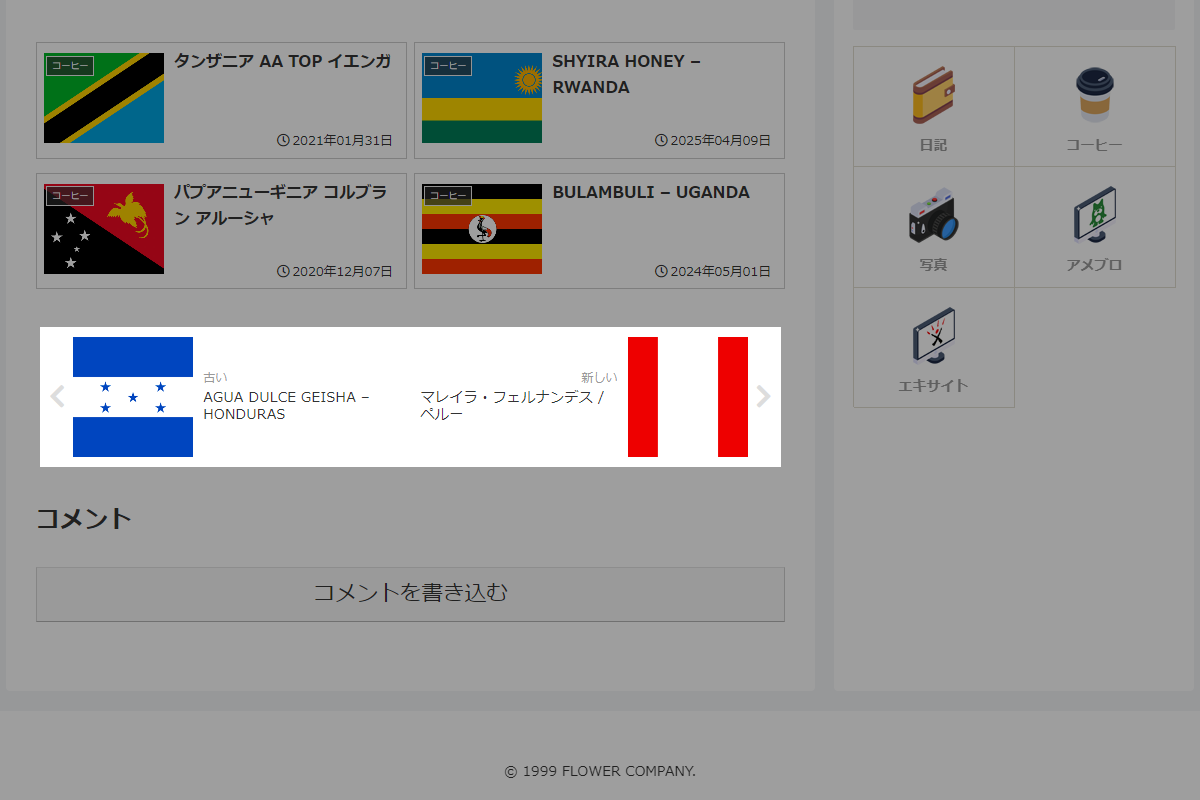
ページ送りボタンのどちらが新しい記事・古い記事か分かりやすくなるよう、ラベルを追加します。
完成イメージ
実装手順
以下のコードをstyle.cssに追加します。
.prev-post-title::before,
.next-post-title::before {
  color: #999;
  font-size: 12px;
  margin-bottom: 0.3em;
  display: block;
}

.next-post-title::before {
  content: '新しい';
  text-align:right;
}

.prev-post-title::before {
  content: '古い';
}
さいごに
今回紹介した方法を使えば、Cocoonの標準機能だけでは達成できなかった「サイト全体の直感的なナビゲーション展開」を完璧に実現できます。
記事ページと一覧ページの双方でナビゲーションの軸が揃うため、スマホユーザーにとっても非常に使いやすい回遊性の高いサイト構造へと進化させることが可能です。