
はじめに
スキン「メイン・イン・ヘブン」は、カスタマイザーで設定した独自の管理項目を、Cocoon本体の設定と同じtheme_mod_テーマ名に保存します。
そのため、Cocoon設定→リセットを使用すると、スキン側の設定だけでなくCocoonに関する全ての設定まで初期化されてしまいます。
スキンの設定だけを一旦リセットして、最初から設定し直したい」という場面では、この仕様が不便に感じることもあるでしょう。
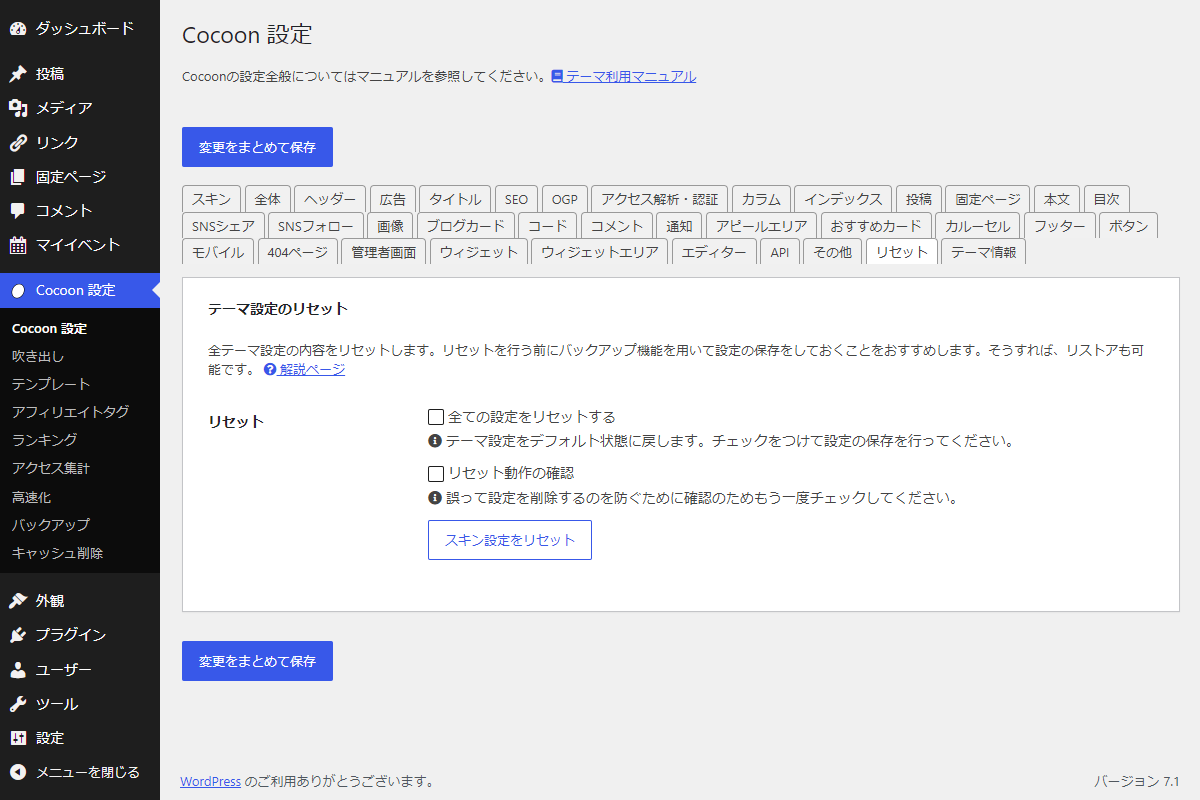
この記事では、スキン設定(hvn_で始まる項目)だけをリセットする専用ボタンを、Cocoonの設定画面に追加する方法について説明します。

完成イメージ
実装手順
以下のコードをfunctions.phpに追加します。
// 管理画面用JS・CSSを追加
add_action('admin_enqueue_scripts', function ($hook_suffix) {
  $page_hook = get_plugin_page_hookname('theme-settings', '');

  if ($hook_suffix !== $page_hook) {
    return;
  }

  ob_start();
  ?>
  jQuery(function ($) {
    const $container = $('#tab-reset-content table.form-table td');

    // 二重追加防止チェック
    if ($container.length && !$('#theme-settings__reset').length) {
      // リセットボタンを追加
      $container.append('<button type="button" id="theme-settings__reset" class="button button-secondary">スキン設定をリセット</button>');
    }

    $('#theme-settings__reset').on('click', function (e) {
      e.preventDefault();

      if (!confirm('スキン設定を初期化します。')) {
        return;
      }

      const data = {
        action: 'theme_settings_reset',
        theme_settings_reset_nonce: '<?php echo esc_js(wp_create_nonce("theme_settings_reset_action")); ?>'
      };

      $.post(ajaxurl, data, function (response) {
        if (response.success) {
          alert('リセットが完了しました。');
          location.reload();
        } else {
          alert('エラーが発生しました。');
        }
      });
    });
  });
  <?php
  wp_add_inline_script('jquery', ob_get_clean());
});


// Ajaxアクションを追加
add_action('wp_ajax_theme_settings_reset', function () {
  // nonceチェック
  check_ajax_referer('theme_settings_reset_action', 'theme_settings_reset_nonce');

  // 権限チェック
  if (!current_user_can('edit_theme_options')) {
    wp_send_json_error();
  }

  // テーマがCocoonのみ有効
  $current_theme = wp_get_theme();
  if ($current_theme->get_template() !== 'cocoon-master') {
    wp_send_json_error();
  }

  // 該当のオプション名を削除
  $mods = get_theme_mods();
  if (!empty($mods)) {
    foreach ($mods as $key => $value) {
      if (strpos($key, 'hvn_') === 0) {
        remove_theme_mod($key);
      }
    }
  }

  wp_send_json_success();
});
さいごに
今回紹介した方法を使えば、Cocoon本体の設定を保持したまま、スキン「メイン・イン・ヘブン」の独自項目だけを安全にリセットできるようになります。
一つひとつの項目を個別に設定し直す手間を省き、一旦全てを初期化してクリーンな状態から作り直したい場合に非常に有効です。
