
はじめに
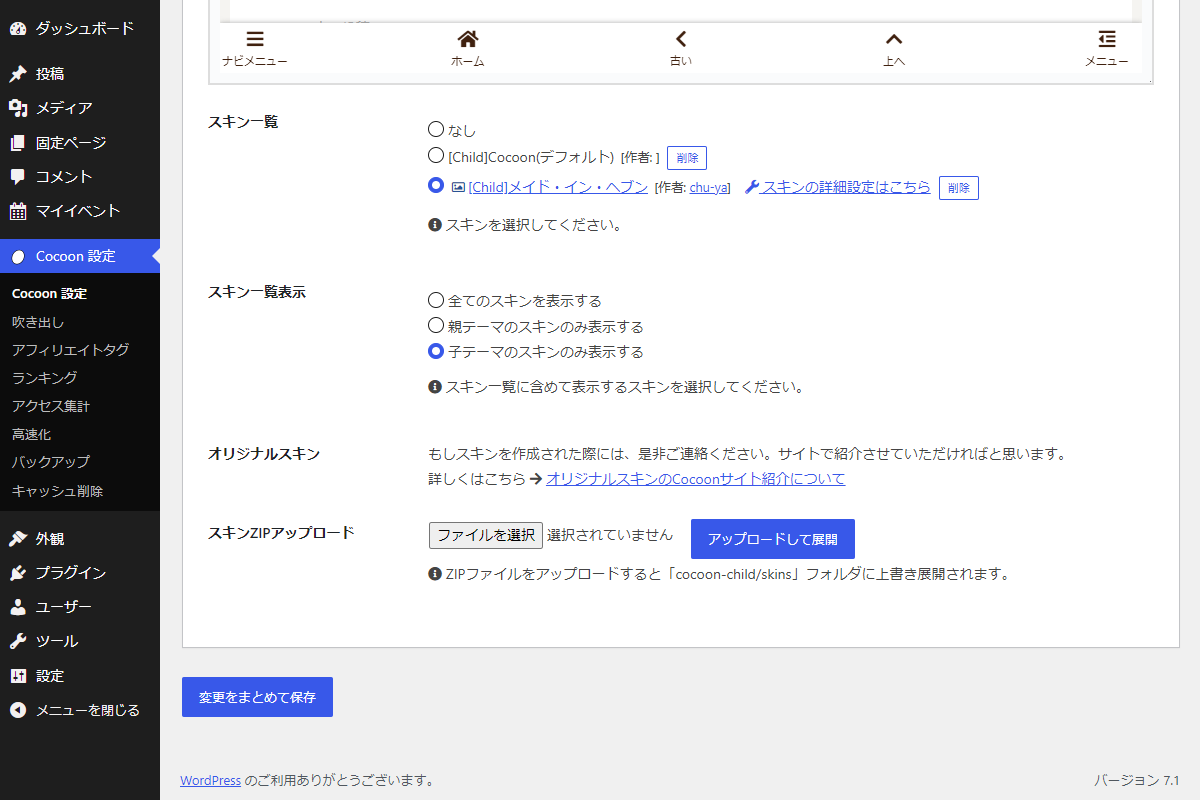
Cocoon設定→スキンにZIPアップロード機能を追加し、管理画面だけでスキンの追加や更新が行えるようにします。
通常はFTPツールを使って手作業でファイルを配置する必要がありますが、この仕組みを利用すれば ZIPを選んで送信するだけで子テーマのskinsフォルダへ自動的に展開され、スキンの差し替え作業を手軽かつ効率的に行えるようになります。
さらに、各スキンには「削除」ボタンが付くため、不要になったスキンも簡単に削除可能です。
この記事では、この方法について説明します。
完成イメージ
実装手順
以下のコードをfunctions.phpに追加します。
// 管理画面にメニューを追加
add_action('admin_menu', function () {
  $page_hook = get_plugin_page_hookname('theme-settings', '');

  if ($page_hook) {
    add_action($page_hook, 'add_skin');
  }
}, 99);


/**
 * Cocoon設定(スキン)にメニューを追加
 *
 * @return void
 */
if (!function_exists('add_skin')):
function add_skin() {
  $nonce_field = wp_nonce_field('add_skin_action', 'add_skin_nonce', true, false);

  ?>
  <script>
  jQuery(function ($) {
    $('#skin .form-table tbody tr:last').after(`
      <tr class="add-skin">
        <th scope="row">スキンZIPアップロード</th>
        <td>
          <form method="POST" enctype="multipart/form-data">
            <?= $nonce_field; ?>
            <input type="file" name="add_skin_zip" accept=".zip">
            <input type="submit" class="button button-primary" value="アップロードして展開" style="margin:0;">
          </form>
          <p class="add-skin__tips">
            <span class="fas fa-info-circle"></span>
            ZIPファイルをアップロードすると「cocoon-child/skins」フォルダに上書き展開されます。
          </p>
        </td>
      </tr>
    `);
  });
  </script>
  <?php
}
endif;


// 管理画面からの設定データ更新
add_action('admin_init', function () {
  if ($_SERVER['REQUEST_METHOD'] !== 'POST') {
    return;
  }

  if (!isset($_FILES['add_skin_zip'])) {
    return;
  }

  $redirect_to = remove_query_arg('skin_uploaded', wp_get_referer());

  // nonceチェック
  if (empty($_POST['add_skin_nonce']) || !wp_verify_nonce($_POST['add_skin_nonce'], 'add_skin_action')) {
    set_transient('my_admin_notice', [
      'type'    => 'error',
      'message' => '不正なアクセスです。',
    ], 30);

    wp_safe_redirect($redirect_to);
    exit;
  }

  // 権限チェック
  if (!current_user_can('manage_options')) {
    set_transient('my_admin_notice', [
      'type'    => 'error',
      'message' => '権限がありません。',
    ], 30);

    wp_safe_redirect($redirect_to);
    exit;
  }

  $uploaded_file = $_FILES['add_skin_zip']['tmp_name'];
  $upload_name   = $_FILES['add_skin_zip']['name'];

  // ZIPファイル以外を拒否
  if (strtolower(pathinfo($upload_name, PATHINFO_EXTENSION)) !== 'zip') {
    set_transient('my_admin_notice', [
      'type'    => 'error',
      'message' => 'ZIPファイルを選択してください。',
    ], 30);

    wp_safe_redirect($redirect_to);
    exit;
  }

  $extract_to = get_stylesheet_directory() . '/skins/';

  // 展開先フォルダを作成
  if (!is_dir($extract_to)) {
    mkdir($extract_to, 0755, true);
  }

  $zip = new ZipArchive();

  // ZIPファイルを開けない場合は処理終了
  if ($zip->open($uploaded_file) !== true) {
    set_transient('my_admin_notice', [
      'type'    => 'error',
      'message' => 'ZIPの展開に失敗しました。',
    ], 30);

    wp_safe_redirect($redirect_to);
    exit;
  }

  // ZIPファイルを展開
  $zip->extractTo($extract_to);
  $zip->close();

  // 成功通知を次の画面表示まで保持
  set_transient('my_admin_notice', [
    'type'    => 'success',
    'message' => 'ZIPを展開し、スキン一覧を更新しました。',
  ], 30);

  // Cocoon設定画面へリダイレクト
  wp_safe_redirect($redirect_to);
  exit;
});


// 通知メッセージを出力
add_action('admin_notices', function () {
  if ($notice = get_transient('my_admin_notice')) {
    echo '<div class="notice notice-' . esc_attr($notice['type']) . ' is-dismissible"><p>' . esc_html($notice['message']) . '</p></div>';
    delete_transient('my_admin_notice');
  }
});


// 管理画面用JS・CSSを追加
add_action('admin_enqueue_scripts', function ($hook_suffix) {
  $page_hook = get_plugin_page_hookname('theme-settings', '');

  if ($hook_suffix !== $page_hook) {
    return;
  }

  $delete_nonce = wp_create_nonce('add_skin_delete_action');

  ob_start();
  ?>
  jQuery(function ($) {

    $('input[name="skin_url"]').each(function () {

      const radio = $(this);
      const value = radio.val();

      if (!value || !value.includes('/wp-content/themes/cocoon-child')) {
        return;
      }

      const match = value.match(/\/skins\/([^\/]+)\//);

      if (!match) {
        return;
      }

      const skinFolder = match[1];
      const btn = $('<button class="button button-small" style="margin-left:8px;">削除</button>');

      radio.closest('li').append(btn);

      btn.on('click', function (e) {
        e.preventDefault();

        if (!confirm('本当に削除してよろしいですか?')) {
          return;
        }

        $.post(ajaxurl, {
          action: 'add_skin_delete',
          skin: skinFolder,
          add_skin_delete_nonce: '<?= $delete_nonce; ?>'
        }, function (res) {
          if (res.success) {
            location.reload();
          } else {
            alert('削除できませんでした:' + res.data);
          }
        });
      });

    });

  });
  <?php
  wp_add_inline_script('jquery', ob_get_clean());
});


// Ajaxアクションを追加
add_action('wp_ajax_add_skin_delete', function () {
  // nonceチェック
  if (empty($_POST['add_skin_delete_nonce']) || !wp_verify_nonce($_POST['add_skin_delete_nonce'], 'add_skin_delete_action')) {
    wp_send_json_error('不正なアクセスです');
  }

  // 権限チェック
  if (!current_user_can('manage_options')) {
    wp_send_json_error('権限がありません');
  }

  // スキン名の指定確認
  if (empty($_POST['skin'])) {
    wp_send_json_error('スキン名が指定されていません');
  }

  $skin = sanitize_text_field($_POST['skin']);
  $dir  = get_stylesheet_directory() . '/skins/' . $skin;

  // スキンフォルダを削除
  if (!is_dir($dir) || !delete_directory_recursive($dir)) {
    wp_send_json_error('フォルダ削除に失敗しました');
  }

  wp_send_json_success();
});


/**
 * ディレクトリと配下のファイルを再帰的に削除
 *
 * @param string $dir 削除対象のディレクトリパス
 * @return bool 削除成功時はtrue、削除失敗時はfalse
 */
if (!function_exists('delete_directory_recursive')):
function delete_directory_recursive($dir) {
  if (!file_exists($dir)) {
    return true;
  }

  // ファイルを単体で削除
  if (!is_dir($dir)) {
    return unlink($dir);
  }

  // ディレクトリ内のファイルとサブディレクトリを削除
  foreach (scandir($dir) as $item) {

    if ($item === '.' || $item === '..') {
      continue;
    }

    $path = $dir . '/' . $item;

    if (is_dir($path)) {
      if (!delete_directory_recursive($path)) {
        return false;
      }
      continue;
    }

    if (!unlink($path)) {
      return false;
    }
  }

  return rmdir($dir);
}
endif;
さいごに
今回紹介した方法を使えば、スキンの追加・更新・削除を管理画面から直接行えるようになり、FTPツールを使った手作業でのアップロードや削除の必要がなくなります。
スキンZIPをアップロードするだけで自動的に展開・上書きされ、不要なスキンも「削除」ボタンで簡単に削除できるため、作業の効率化とミス防止に役立ちます。

