
はじめに

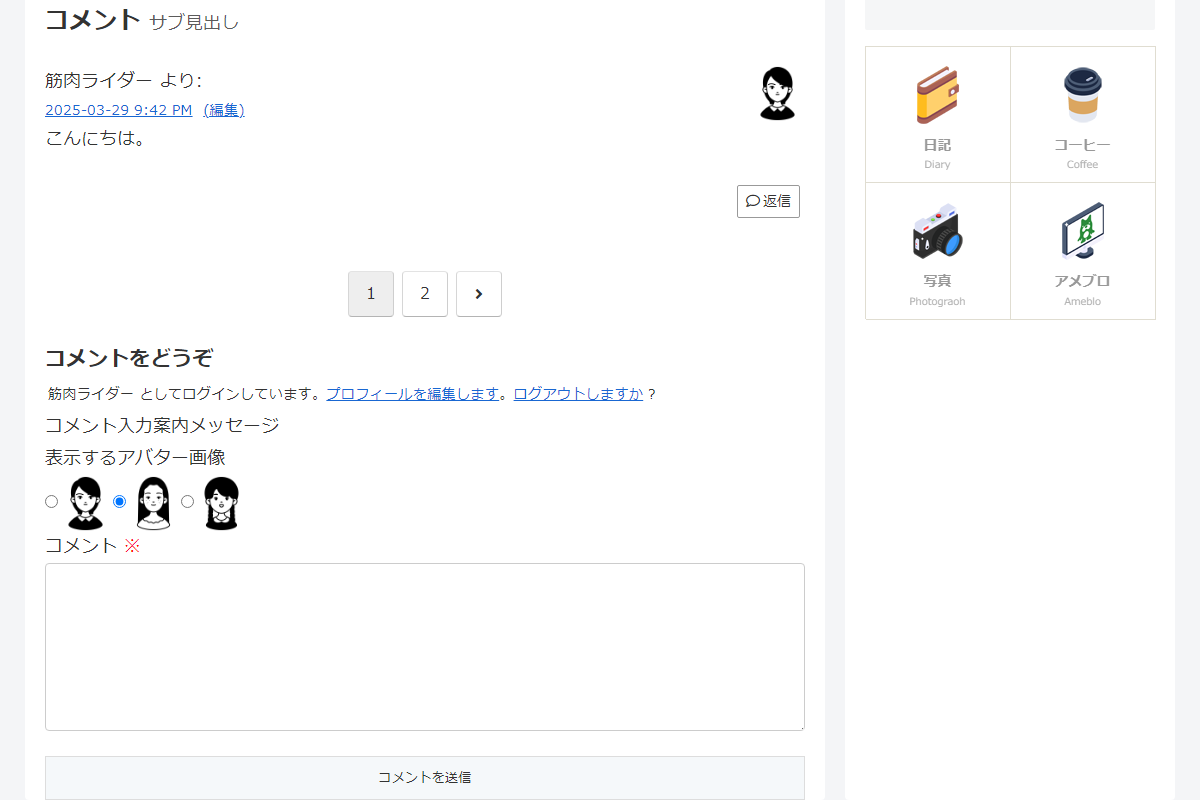
設定→ディスカッション→「アバターの表示」をオンにすると、コメント欄にアバターが表示されます(図1参照)。
デフォルトでは、アバターはユーザー→プロフィールで設定した1つの画像のみが表示されます。
そこで、ログインユーザーは、コメント投稿時にアバターを変更できるようにします。
コメント投稿時にアバター画像を選択することで、投稿者の気持ちをより効果的に伝えられます。
この記事では、この方法について説明します。
完成イメージ
実装手順
以下の手順で実装します。
- ラベルPHPを追加(コメント欄)
以下のコードをfunctions.phpに追加します。
/** * 設定値を管理 * * @return array アイコンURLの配列 */ if (!function_exists('get_comment_icon_urls')): function get_comment_icon_urls() { return [ 1 => 'https://example.com/wp-content/uploads/avatar1.png', 2 => 'https://example.com/wp-content/uploads/avatar2.png', 3 => 'https://example.com/wp-content/uploads/avatar3.png', ]; } endif; // フロント用JS・CSSを追加 add_action('wp_enqueue_scripts', function () { if (!is_singular() || !comments_open()) { return; } ob_start(); ?> .comment-icon { display: flex; gap: 10px; .comment-icon__item { align-items: center; display: flex; gap: 4px; } } <?php $handle = 'comment-icon'; wp_register_style($handle, false); wp_enqueue_style($handle); wp_add_inline_style($handle, ob_get_clean()); }); // コメント欄の入力フォームを変更 add_filter('comment_form_field_comment', function ($content) { if (!is_user_logged_in()) { return $content; } $icons = get_comment_icon_urls(); if (empty($icons)) { return $content; } $post_icon = 1; // クッキーが保存したアバター番号を取得 if (isset($_COOKIE['comment_icon'])) { $cookie_val = absint($_COOKIE['comment_icon']); if (array_key_exists($cookie_val, $icons)) { $post_icon = $cookie_val; } } ob_start(); ?> <label>表示するアバター画像</label> <div class="comment-icon"> <?php foreach ($icons as $key => $url): ?> <?php $checked = ($key === $post_icon) ? 'checked' : ''; ?> <label class="comment-icon__item"> <input type="radio" name="comment_icon" value="<?= esc_attr($key); ?>" <?= $checked; ?>> <img src="<?= esc_url($url); ?>" width="55" height="55" alt=""> </label> <?php endforeach; ?> </div> <?php return ob_get_clean() . $content; }); // コメントを保存 add_action('comment_post', function ($comment_id) { if (!get_comment($comment_id)) { return; } if (!isset($_POST['comment_icon'])) { return; } $icons = get_comment_icon_urls(); $post_icon = absint($_POST['comment_icon']); if (!array_key_exists($post_icon, $icons)) { return; } // クッキーにアバター番号を保存 setcookie('comment_icon', $post_icon, time() + WEEK_IN_SECONDS, '/'); // コメントメタを更新 update_comment_meta($comment_id, 'my_comment_icon', $post_icon); }); // コメント欄に選択したアバター画像を表示 add_filter('get_avatar', function ($avatar, $id_or_email) { $comment = null; if (is_numeric($id_or_email)) { $comment = get_comment($id_or_email); } elseif (is_object($id_or_email) && isset($id_or_email->comment_ID)) { $comment = $id_or_email; } if (!$comment) { return $avatar; } $key = get_comment_meta($comment->comment_ID, 'my_comment_icon', true); $icons = get_comment_icon_urls(); if (!$key || !isset($icons[$key])) { return $avatar; } return '<img src="' . esc_url($icons[$key]) . '" class="avatar photo" height="55" width="55" alt="" />'; }, 100001, 2); - ラベルPHPを追加(コメント一覧)
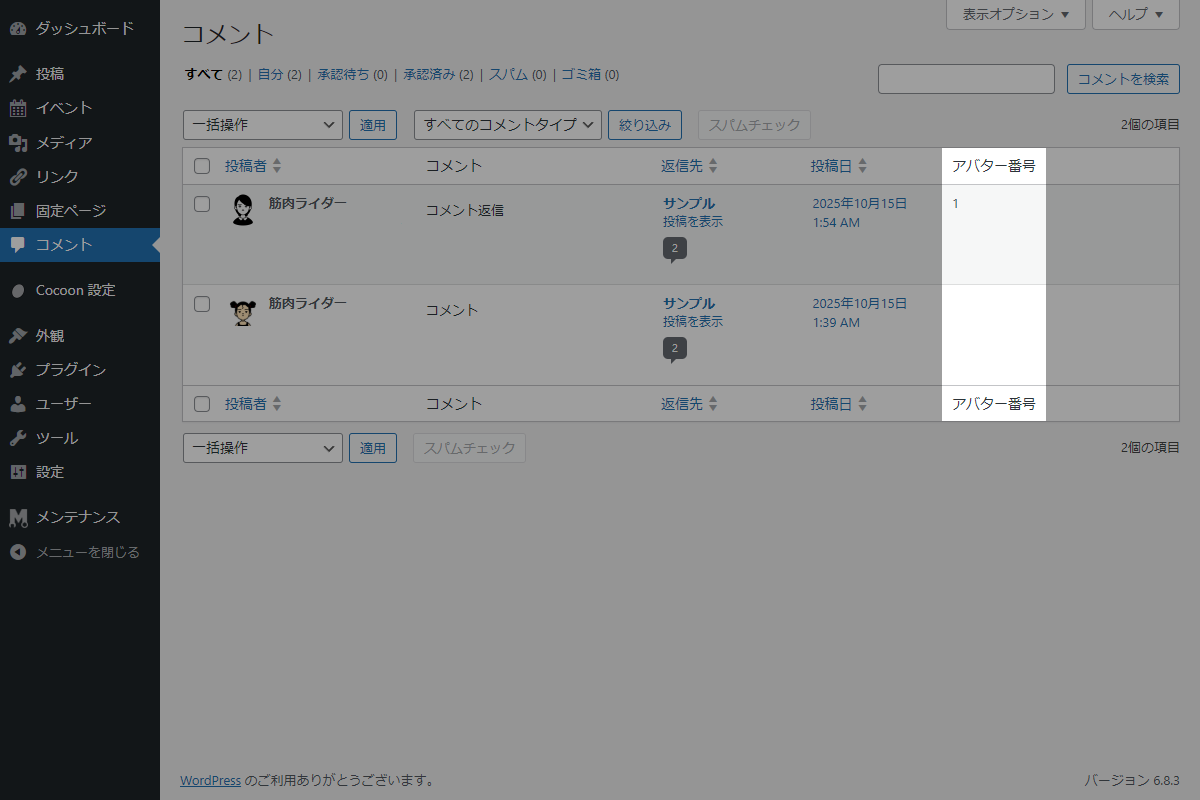
以下のコードをfunctions.phpに追加します。
// 管理画面一覧にカラムを追加 add_filter('manage_edit-comments_columns', function ($columns) { $columns['comment_icon'] = 'アバター番号'; return $columns; }); // 管理画面一覧のカラムにデータを表示 add_action('manage_comments_custom_column', function ($column, $comment_id) { if ($column !== 'comment_icon') { return; } $post_icon = get_comment_meta($comment_id, 'my_comment_icon', true); echo esc_html($post_icon); }, 10, 2); - ラベルPHPを追加(コメント編集画面)
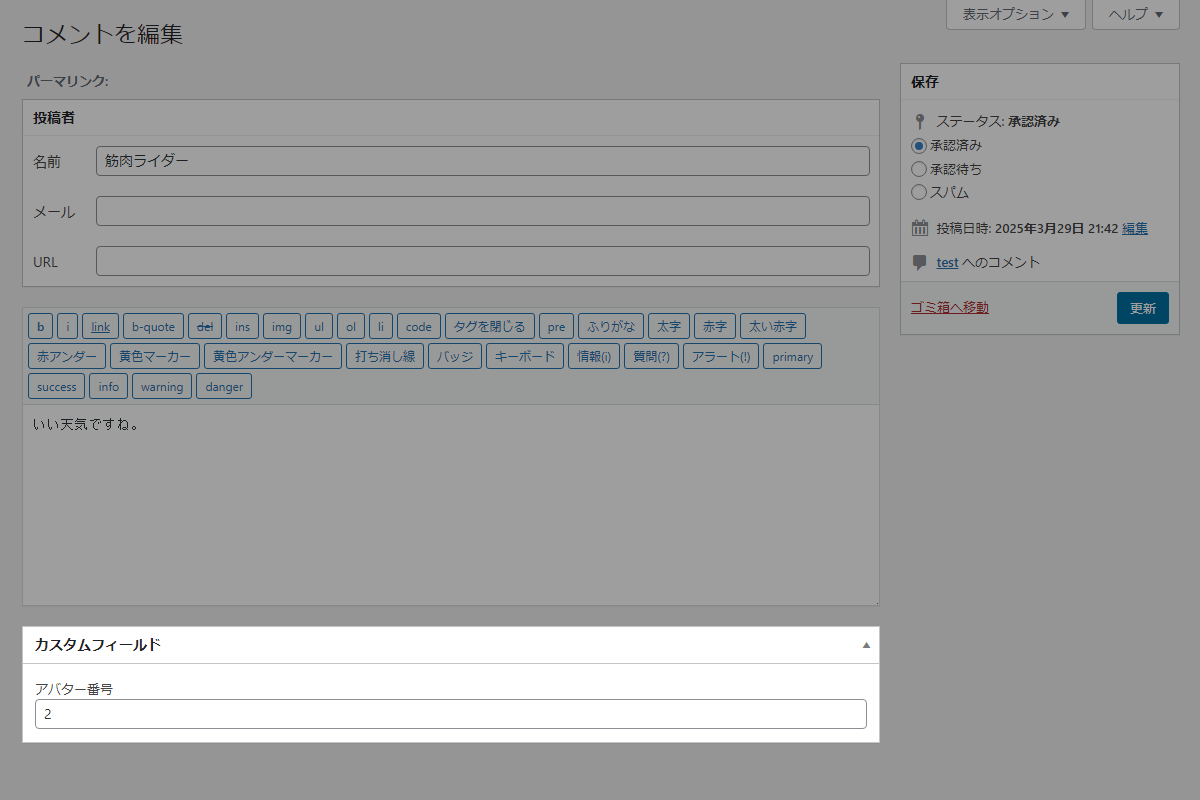
以下のコードをfunctions.phpに追加します。
/**
 * メタボックスの入力フォームを出力
 *
 * @param WP_Comment $comment コメントオブジェクト
 * @return void
 */
if (!function_exists('render_comment_icon')):
function render_comment_icon($comment) {
  $post_icon = get_comment_meta($comment->comment_ID, 'my_comment_icon', true);
  wp_nonce_field('comment_icon_action', 'comment_icon_nonce');
  ?>
  <p>
    <label for="comment_icon">アバター番号</label>
    <input type="text" id="comment_icon" name="comment_icon" value="<?= esc_attr($post_icon); ?>" class="widefat" />
  </p>
  <?php
}
endif;


// メタボックスを追加
add_action('add_meta_boxes_comment', function () {
  add_meta_box(
    'comment_icon',
    'カスタムフィールド',
    'render_comment_icon',
    'comment',
    'normal',
    'high'
  );
});


// コメントデータを保存
add_action('edit_comment', function ($comment_id) {
  // nonceチェック
  if (!isset($_POST['comment_icon_nonce']) || !wp_verify_nonce($_POST['comment_icon_nonce'], 'comment_icon_action')) {
    return;
  }

  // 自動保存チェック
  if (defined('DOING_AUTOSAVE') && DOING_AUTOSAVE) {
    return;
  }

  // 権限チェック
  if (!current_user_can('edit_comment', $comment_id)) {
    return;
  }

  if (isset($_POST['comment_icon'])) {
    $post_icon = sanitize_text_field($_POST['comment_icon']);
    update_comment_meta($comment_id, 'my_comment_icon', $post_icon);
  }
});
さいごに
今回紹介した方法を使えば、ログインユーザーがコメント欄から直接アバター画像を選択できるようになり、よりパーソナルなコメント投稿が可能になります。