はじめに
WordPressの標準コメント欄は、放置していると海外からの大量のスパムボットに狙われがちです。
だからといって、海外製の画像キャプチャプラグインなどを導入すると、ユーザーの入力手間が増えたり、サイトの読み込みが重くなったりすることがあります。
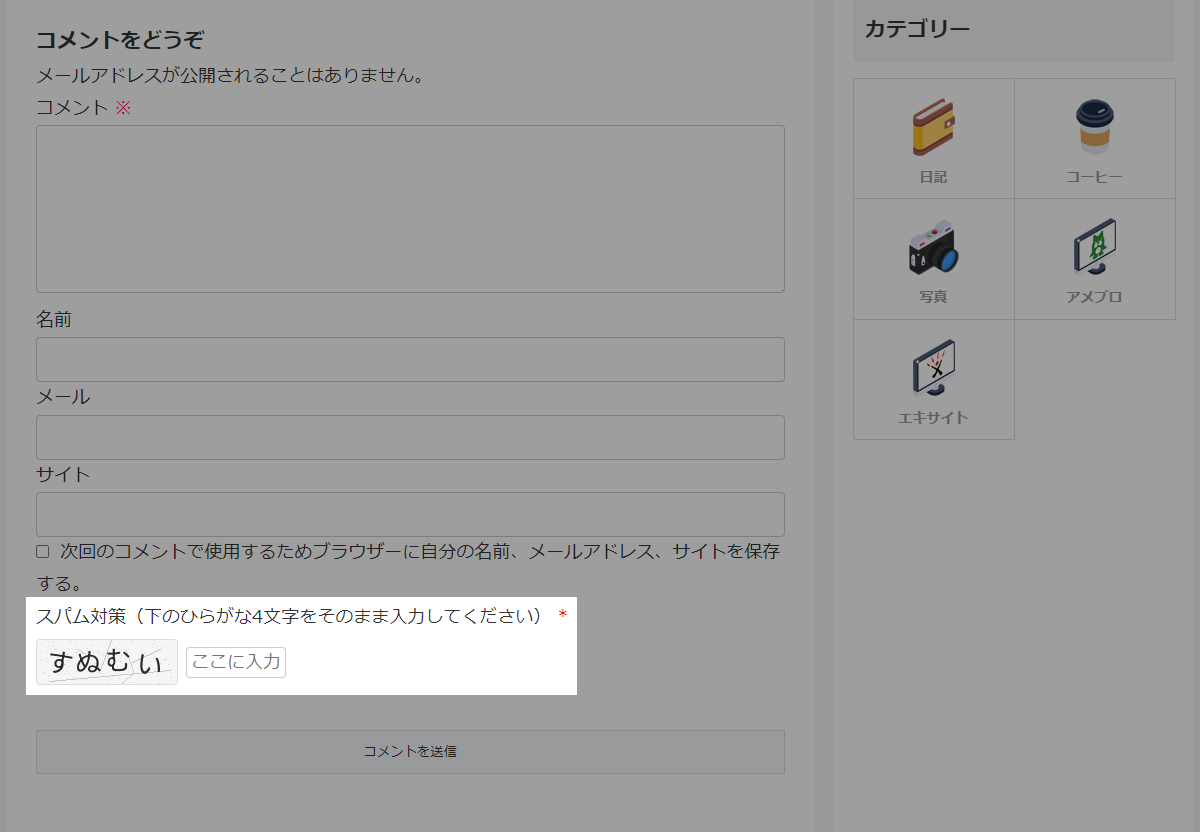
そこで、プラグイン「SI CAPTCHA Anti-Spam」などを使用せずに、海外ボットに極めて有効な「ランダムなひらがな4桁の確認キー」をコメント欄に追加します。
この記事では、この方法について説明します。
完成イメージ
実装手順
以下のコードをfunctions.phpに追加します。
/**
 * ひらがな4文字のランダム文字列を生成
 *
 * @return string 生成されたひらがな4文字の文字列
 */
if (!function_exists('generate_random_comment_hiragana_code')):
function generate_random_comment_hiragana_code() {
  // 使用するひらがな文字を設定
  $hiragana_chars = [
    'あ', 'い', 'う', 'え', 'お',
    'か', 'き', 'く', 'け', 'こ',
    'さ', 'し', 'す', 'せ', 'そ',
    'た', 'ち', 'つ', 'て', 'と',
    'な', 'に', 'ぬ', 'ね', 'の',
    'は', 'ひ', 'ふ', 'へ', 'ほ',
    'ま', 'み', 'む', 'め', 'も',
    'や', 'ゆ', 'よ',
    'ら', 'り', 'る', 'れ', 'ろ',
    'わ',
  ];

  $string = '';

  // 配列からランダムに4文字を抽出
  for ($i = 0; $i < 4; $i++) {
    $string .= $hiragana_chars[array_rand($hiragana_chars)];
  }

  return $string;
}
endif;


/**
 * ひらがな文字列をCAPTCHA画像に変換
 *
 * @param string $text 描画するひらがな文字列
 * @return string|false 画像のData URI、失敗時はfalse
 */
if (!function_exists('generate_comment_hiragana_captcha_image')):
function generate_comment_hiragana_captcha_image($text) {
  // GDライブラリとTrueTypeフォント描画関数の存在を確認
  if (!function_exists('imagecreatetruecolor') || !function_exists('imagettftext')) {
    return false;
  }

  // Cocoon親テーマのNoto Sans JPフォントパスを設定
  $font_path = get_template_directory() . '/webfonts/googlefonts/NotoSansJP-Regular.ttf';

  // フォントファイルが存在しない場合は処理対象外
  if (!file_exists($font_path)) {
    return false;
  }

  // 画像サイズを設定
  $width  = 140;
  $height = 44;

  $image = imagecreatetruecolor($width, $height);

  // 背景色を設定
  $bg = imagecolorallocate($image, 245, 245, 245);
  imagefill($image, 0, 0, $bg);

  // ノイズ線を描画
  for ($i = 0; $i < 6; $i++) {
    $line_color = imagecolorallocate($image, rand(180, 210), rand(180, 210), rand(180, 210));
    imageline($image, rand(0, $width), rand(0, $height), rand(0, $width), rand(0, $height), $line_color);
  }

  // ノイズ点を描画
  for ($i = 0; $i < 150; $i++) {
    $dot_color = imagecolorallocate($image, rand(200, 230), rand(200, 230), rand(200, 230));
    imagesetpixel($image, rand(0, $width), rand(0, $height), $dot_color);
  }

  // 文字色とフォントサイズを設定
  $text_color = imagecolorallocate($image, 40, 40, 40);
  $font_size  = 20;

  $x   = 8;
  $len = mb_strlen($text, 'UTF-8');

  // ひらがなを1文字ずつ描画
  for ($i = 0; $i < $len; $i++) {
    $char  = mb_substr($text, $i, 1, 'UTF-8');
    $angle = rand(-12, 12);
    $y     = rand(30, 36);

    imagettftext($image, $font_size, $angle, $x, $y, $text_color, $font_path, $char);

    $x += 30;
  }

  // 画像データをPNGに変換
  ob_start();
  imagepng($image);
  $image_data = ob_get_clean();

  // 画像リソースを解放
  imagedestroy($image);

  // PNGデータをBase64形式へ変換
  return 'data:image/png;base64,' . base64_encode($image_data);
}
endif;


// コメント欄を変更
add_filter('comment_form_default_fields', function ($fields) {
  // ログインユーザーは処理対象外
  if (is_user_logged_in()) {
    return $fields;
  }

  // ランダムなひらがな4文字を生成
  $captcha_text = generate_random_comment_hiragana_code();

  // 照合用トークンを発行
  $token = wp_generate_password(16, false);

  // 正解のひらがなをTransientに保存
  set_transient('comment_hiragana_cap_' . $token, $captcha_text, 600);

  // CAPTCHA画像を生成
  $image_src = generate_comment_hiragana_captcha_image($captcha_text);

  if ($image_src) {
    // CAPTCHA画像を表示
    $captcha_display = '<img src="' . esc_attr($image_src) . '" alt="captcha" style="vertical-align: middle; border: 1px solid #ddd; border-radius: 4px;" />';
  } else {
    // CAPTCHAテキストを表示
    $captcha_display = '<strong style="font-size: 1.2em; background-color: #f0f0f0; padding: 4px 10px; display: inline-block; border: 1px solid #ddd; user-select: none; -webkit-user-select: none; -moz-user-select: none; -ms-user-select: none; letter-spacing: 2px;">' . esc_html($captcha_text) . '</strong>';
  }

  ob_start();
  ?>
  <p class="comment-hiragana" style="margin-bottom: 20px;">
    <label for="comment_hiragana" class="comment-hiragana__label" style="display: block; margin-bottom: 5px;">スパム対策(下のひらがな4文字をそのまま入力してください) <span class="required" style="color: red;">*</span></label>
    <span class="comment-hiragana__display" style="display: inline-flex; align-items: center; gap: 8px;">
      <?php echo $captcha_display; ?>
      <input id="comment_hiragana" name="comment_hiragana" type="text" size="10" maxlength="4" autocomplete="off" required="required" placeholder="ここに入力" class="comment-hiragana__input" style="width: 100px; padding: 4px; text-align: center;" />
    </span>
    <input type="hidden" name="comment_hiragana_token" value="<?php echo esc_attr($token); ?>" />
  </p>
  <?php
  $fields['comment_hiragana'] = ob_get_clean();

  return $fields;
});


// 入力された確認キーを検証
add_filter('preprocess_comment', function ($commentdata) {
  // ログインユーザーは処理対象外
  if (is_user_logged_in()) {
    return $commentdata;
  }

  // フォームから送信されたトークンと入力値を取得
  $token = isset($_POST['comment_hiragana_token']) ? sanitize_text_field($_POST['comment_hiragana_token']) : '';
  $input = isset($_POST['comment_hiragana']) ? trim($_POST['comment_hiragana']) : '';

  // トークンを元に正解データを取得
  $correct_answer = $token
    ? get_transient('comment_hiragana_cap_' . $token)
    : false;

  // 使用済みのTransientを削除
  if ($token) {
    delete_transient('comment_hiragana_cap_' . $token);
  }

  // 正解データが存在しない場合や入力値が一致しない場合は処理対象外
  if ($correct_answer === false || $input !== $correct_answer) {
    // 投稿先の記事IDを取得
    $comment_post_ID = isset($_POST['comment_post_ID'])
      ? intval($_POST['comment_post_ID'])
      : 0;

    // 投稿先の記事URLを取得
    $redirect_url = get_permalink($comment_post_ID);

    // 記事URLが取得できない場合はトップページへ置換
    if (!$redirect_url) {
      $redirect_url = home_url('/');
    }

    // コメントフォームへのアンカーを追加
    $redirect_url = trailingslashit($redirect_url) . '#respond';

    // エラー画面を表示
    wp_die(
      'エラー: スパム対策のひらがな4文字が間違っています。新しいコードに更新しましたので、もう一度入力してください。' .
      '<p><a href="' . esc_url($redirect_url) . '" class="button" style="text-decoration: none;">記事に戻って再入力する</a></p>',
      'コメントエラー',
      [
        'response'  => 403,
        'back_link' => false,
      ]
    );
  }

  return $commentdata;
});
参考:コメント欄に算数クイズのスパム対策を追加する方法
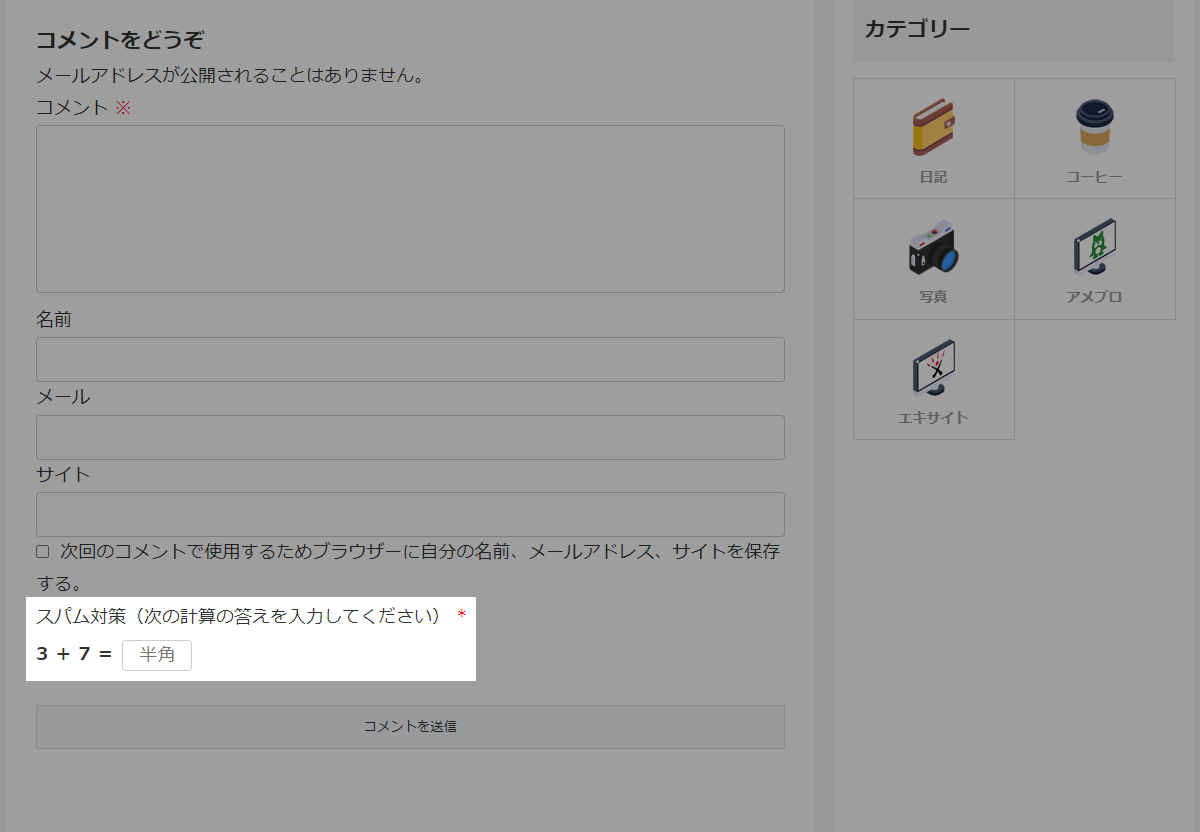
算数クイズ式のスパム対策を実装します。
完成イメージ
実装手順
以下のコードをfunctions.phpに追加します。
// コメント欄を変更
add_filter('comment_form_default_fields', function ($fields) {
  // ログインユーザーは処理対象外
  if (is_user_logged_in()) {
    return $fields;
  }

  // 計算問題の数字を生成
  $num1   = rand(0, 9);
  $num2   = rand(0, 9);
  $answer = $num1 + $num2;

  // 照合用トークンを発行
  $token = wp_generate_password(16, false);

  // 正解の計算結果をTransientに登録
  set_transient('comment_math_cap_' . $token, $answer, 600);

  ob_start();
  ?>
  <p class="comment-math" style="margin-bottom: 20px;">
    <label for="comment_math" class="comment-math__label" style="display: block; margin-bottom: 5px;">スパム対策(次の計算の答えを入力してください) <span class="required" style="color: red;">*</span></label>
    <span class="comment-math__display" style="display: inline-flex; align-items: center; gap: 8px;">
      <strong><?php echo $num1; ?> + <?php echo $num2; ?> =</strong>
      <input id="comment_math" name="comment_math" type="text" size="6" maxlength="2" autocomplete="off" required="required" placeholder="半角" class="comment-math__input" style="width: 70px; padding: 4px; text-align: center;" />
    </span>
    <input type="hidden" name="comment_math_token" value="<?php echo esc_attr($token); ?>" />
  </p>
  <?php
  $fields['comment_math'] = ob_get_clean();

  return $fields;
});


// 入力された確認キーを検証
add_filter('preprocess_comment', function ($commentdata) {
  // ログインユーザーは処理対象外
  if (is_user_logged_in()) {
    return $commentdata;
  }

  // トークンと入力値を取得
  $token = isset($_POST['comment_math_token']) ? sanitize_text_field($_POST['comment_math_token']) : '';
  $input = isset($_POST['comment_math']) ? intval(trim($_POST['comment_math'])) : '';

  // 正解データを取得
  $correct_answer = $token ? get_transient('comment_math_cap_' . $token) : false;

  // 使用済みのTransientを削除
  if ($token) {
    delete_transient('comment_math_cap_' . $token);
  }

  // 正解データが存在しない場合や入力値が一致しない場合
  if ($correct_answer === false || $input !== intval($correct_answer)) {
    // 投稿先の記事IDを取得
    $comment_post_ID = isset($_POST['comment_post_ID']) ? intval($_POST['comment_post_ID']) : 0;

    // 投稿先の記事URLを取得
    $redirect_url = get_permalink($comment_post_ID);

    // 記事URLが取得できない場合はトップページへ置換
    if (!$redirect_url) {
      $redirect_url = home_url('/');
    }

    // コメントフォームへのアンカーを追加
    $redirect_url = trailingslashit($redirect_url) . '#respond';

    // エラー画面を表示
    wp_die(
      'エラー: スパム対策の計算結果が間違っています。新しい計算問題に更新しましたので、もう一度入力してください。' .
      '<p><a href="' . esc_url($redirect_url) . '" class="button" style="text-decoration: none;">記事に戻って再入力する</a></p>',
      'コメントエラー',
      [
        'response'  => 403,
        'back_link' => false,
      ]
    );
  }

  return $commentdata;
});
さいごに
今回紹介した方法を使えば、プラグインを使わずに、スマートかつ強力にコメントスパムを遮断することができます。
特に「ひらがな」を使った認証は、日本語を解さない海外の自動スパムボットに対して非常に高い効果を発揮します。
サイトの軽量化とセキュリティ強化を同時に実現したい方は、ぜひ自社サイトのカスタマイズに取り入れてみてください。