はじめに
Cocoon設定→投稿では、カテゴリー・タグの表示位置やページ送りナビの表示位置を設定できます。
しかし、管理画面のドロップダウンメニューから一つずつ変更しても、実際にどこへレイアウトされるのかを直感的にイメージするのは難しいという問題があります。
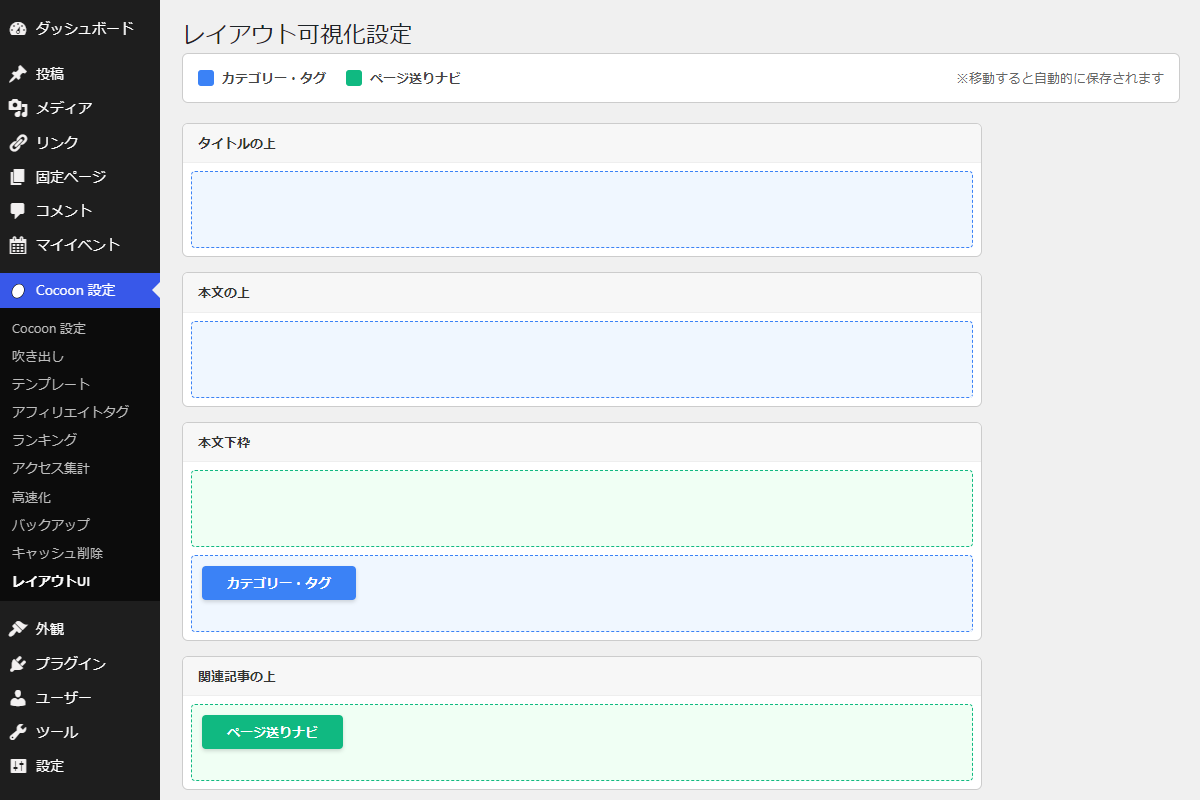
そこで、ページビルダーのように大まかなレイアウトを可視化し、各メニュー項目をドラッグ&ドロップで配置できるUIを作成します。
この記事では、この方法について説明します。
完成イメージ
実装手順
以下のコードをfunctions.phpに追加します。
// 設定メニューを追加
add_action('admin_menu', function () {
  add_submenu_page(
    THEME_SETTINGS_PAGE,
    'レイアウトUI',
    'レイアウトUI',
    'manage_options',
    'layout_visual_ui',
    'render_layout_visual_ui'
  );
}, 99);


/**
 * 管理画面ページを出力
 *
 * @return void
 */
if (!function_exists('render_layout_visual_ui')):
function render_layout_visual_ui() {
  // 配置設定を取得
  $config = get_layout_visual_config();

  // 現在のカスタマイザー設定値を取得
  $current_cat = get_theme_mod('category_tag_display_position', 'content_bottom');
  $current_pager = get_theme_mod('post_navi_position', 'under_related');

  ?>
  <div class="wrap">
    <h1>レイアウト可視化設定</h1>

    <!-- 凡例表示 -->
    <div class="layout-legend">
      <div class="layout-legend__item">
        <span class="layout-legend__chip" style="background-color: #3b82f6;"></span>
        <span style="font-weight: bold;">カテゴリー・タグ</span>
      </div>

      <div class="layout-legend__item">
        <span class="layout-legend__chip" style="background-color: #10b981;"></span>
        <span style="font-weight: bold;">ページ送りナビ</span>
      </div>

      <div style="color: #666; font-size: 13px; margin-left: auto;">
        ※移動すると自動的に保存されます
      </div>
    </div>

    <!-- レイアウト設定UI -->
    <div class="layout-ui">

      <?php foreach ($config as $id => $data): ?>
        <!-- レイアウトブロック -->
        <div class="layout-ui__zone">

          <div class="layout-ui__label"><?php echo esc_html($data['label']); ?></div>

          <?php
          // 子要素を取得
          $targets = isset($data['children'])
            ? $data['children']
            : [$id => $data];

          foreach ($targets as $target_id => $t):
            // 要素タイプを取得
            $type = isset($t['type']) ? $t['type'] : '';

            // 要素タイプに応じたクラスを設定
            $class = ($type === 'cat')
              ? 'layout-ui__drop-zone--category'
              : 'layout-ui__drop-zone--pager';
            ?>

            <!-- ドロップエリア -->
            <div class="layout-ui__drop-zone <?php echo esc_attr($class); ?>" data-zone="<?php echo esc_attr($target_id); ?>">

              <?php if ($type === 'cat' && $current_cat === $t['val']): ?>
                <div class="layout-ui__panel layout-ui__panel--category">カテゴリー・タグ</div>
              <?php endif; ?>

              <?php if ($type === 'pager' && $current_pager === $t['val']): ?>
                <div class="layout-ui__panel layout-ui__panel--pager">ページ送りナビ</div>
              <?php endif; ?>

            </div>
          <?php endforeach; ?>

        </div>
      <?php endforeach; ?>

    </div>
  </div>
  <?php
}
endif;


// 管理画面用JS・CSSを追加
add_action('admin_enqueue_scripts', function () {
  if (($_GET['page'] ?? '') !== 'layout_visual_ui') {
    return;
  }

  ob_start();
  ?>
  /* カテゴリー配置エリア */
  .layout-ui__drop-zone--category {
    background-color: #f0f7ff;
    border: 1px dashed #3b82f6;
  }

  /* ドロップエリア共通 */
  .layout-ui__drop-zone {
    border-radius: 4px;
    margin: 8px;
    min-height: 55px;
    padding: 10px;
    transition: background 0.2s;
  }

  /* ラベル表示 */
  .layout-ui__label {
    background-color: #f7f7f7;
    border-bottom: 1px solid #eee;
    color: #333;
    font-weight: bold;
    padding: 10px 15px;
  }

  /* 全体ラッパー */
  .layout-ui {
    margin-top: 20px;
    max-width: 800px;
  }

  /* 各ゾーン */
  .layout-ui__zone {
    background-color: #fff;
    border: 1px solid #ccc;
    border-radius: 6px;
    margin-bottom: 15px;
    overflow: hidden;
  }

  /* 凡例ボックス */
  .layout-legend {
    align-items: center;
    background-color: #fff;
    border: 1px solid #ccc;
    border-radius: 6px;
    display: flex;
    gap: 20px;
    margin-bottom: 20px;
    padding: 15px;
  }

  .layout-legend__item {
    align-items: center;
    display: flex;
    gap: 8px;
  }

  .layout-legend__chip {
    border-radius: 3px;
    display: inline-block;
    height: 16px;
    width: 16px;
  }

  /* ページナビエリア */
  .layout-ui__drop-zone--pager {
    background-color: #f0fff4;
    border: 1px dashed #10b981;
  }

  /* ドラッグ対象 */
  .layout-ui__panel {
    border-radius: 4px;
    box-shadow: 0 2px 4px rgba(0, 0, 0, 0.15);
    color: #fff;
    cursor: move;
    display: block;
    font-weight: bold;
    padding: 8px 25px;
    width: fit-content;
  }

  .layout-ui__panel--category {
    background-color: #3b82f6;
  }

  .layout-ui__panel--pager {
    background-color: #10b981;
  }

  /* 並び替えプレースホルダー */
  .layout-ui__placeholder {
    background: rgba(0, 0, 0, 0.05);
    border: 1px dashed #bbb;
    display: block;
    height: 40px;
  }
  <?php
  wp_add_inline_style('wp-admin', ob_get_clean());

  ob_start();
  ?>
  jQuery(function ($) {

    // Sortable設定
    const opt = {
      connectWith: '.layout-ui__drop-zone--category',
      placeholder: 'layout-ui__placeholder',
      update: save
    };

    // カテゴリーゾーンを初期化
    $('.layout-ui__drop-zone--category').sortable(opt);

    // ページナビゾーンを初期化
    $('.layout-ui__drop-zone--pager').sortable({
      ...opt,
      connectWith: '.layout-ui__drop-zone--pager'
    });

    /**
     * 現在の配置ゾーンを取得してAJAX送信
     *
     * @return {void}
     */
    function save() {
      let data = {
        action: 'save_layout_visual_ui',
        cat: '',
        pager: ''
      };

      // カテゴリーの現在位置を取得
      $('.layout-ui__panel--category').each(function () {
        data.cat = $(this).closest('.layout-ui__drop-zone').data('zone');
      });

      // ページナビの現在位置を取得
      $('.layout-ui__panel--pager').each(function () {
        data.pager = $(this).closest('.layout-ui__drop-zone').data('zone');
      });

      // WordPress AJAXへ送信
      $.post(ajaxurl, data);
    }
  });
  <?php

  wp_enqueue_script('jquery-ui-sortable');
  wp_add_inline_script('jquery-ui-sortable', ob_get_clean());
});


// Ajaxアクションを追加
add_action('wp_ajax_save_layout_visual_ui', function () {
  // 権限チェック
  if (!current_user_can('manage_options')) {
    wp_die();
  }

  // 配置設定を取得
  $config = get_layout_visual_config();

  $cat_map = [];
  $pager_map = [];

  // 保存用マッピングを生成
  foreach ($config as $id => $data) {

    // 子要素を取得
    $targets = isset($data['children'])
      ? $data['children']
      : [$id => $data];

    foreach ($targets as $tid => $t) {

      // カテゴリーの保存値を登録
      if (isset($t['type']) && $t['type'] === 'cat') {
        $cat_map[$tid] = $t['val'];
      }

      // ページナビの保存値を登録
      if (isset($t['type']) && $t['type'] === 'pager') {
        $pager_map[$tid] = $t['val'];
      }
    }
  }

  // カテゴリー位置を保存
  if (isset($cat_map[$_POST['cat']])) {
    set_theme_mod(
      'category_tag_display_position',
      $cat_map[$_POST['cat']]
    );
  }

  // ページナビ位置を保存
  if (isset($pager_map[$_POST['pager']])) {
    set_theme_mod(
      'post_navi_position',
      $pager_map[$_POST['pager']]
    );
  }

  wp_die();
});


/**
 * レイアウト設定を取得
 *
 * @return array レイアウト定義配列
 */
if (!function_exists('get_layout_visual_config')):
function get_layout_visual_config() {
  // レイアウト構造とドロップエリアを定義
  return [
    'title_top' => [
      'label' => 'タイトルの上',
      'type'  => 'cat',
      'val'   => 'title_top'
    ],

    'content_top' => [
      'label' => '本文の上',
      'type'  => 'cat',
      'val'   => 'content_top'
    ],

    'content_bottom' => [
      'label' => '本文下枠',
      'children' => [
        'cb_pager' => [
          'type' => 'pager',
          'val'  => 'under_content',
          'name' => 'ページ送りナビ'
        ],
        'cb_cat' => [
          'type' => 'cat',
          'val'  => 'content_bottom',
          'name' => 'カテゴリー・タグ'
        ]
      ]
    ],

    'over_related' => [
      'label' => '関連記事の上',
      'type'  => 'pager',
      'val'   => 'over_related'
    ],

    'under_related' => [
      'label' => '関連記事の下',
      'type'  => 'pager',
      'val'   => 'under_related'
    ],

    'under_comment' => [
      'label' => 'コメントの下',
      'type'  => 'pager',
      'val'   => 'under_comment'
    ]
  ];
}
endif;
さいごに
今回紹介した方法を使えば、設定項目を視覚的に操作できるようになり、レイアウトのイメージを直感的に把握できるようになります。
特に、複数の表示位置を持つ要素を扱う場合でも、実際の配置を確認しながら調整できるため、設定ミスの防止や作業効率の向上につながります。