はじめに
WordPressには登録済みの画像を直接差し替える機能がなく、従来は「再アップロードして投稿内の画像も貼り直す」必要がありました。
そこで、プラグイン「Enable Media Replace」などを使わずに、メディアの画像を差し替えます。
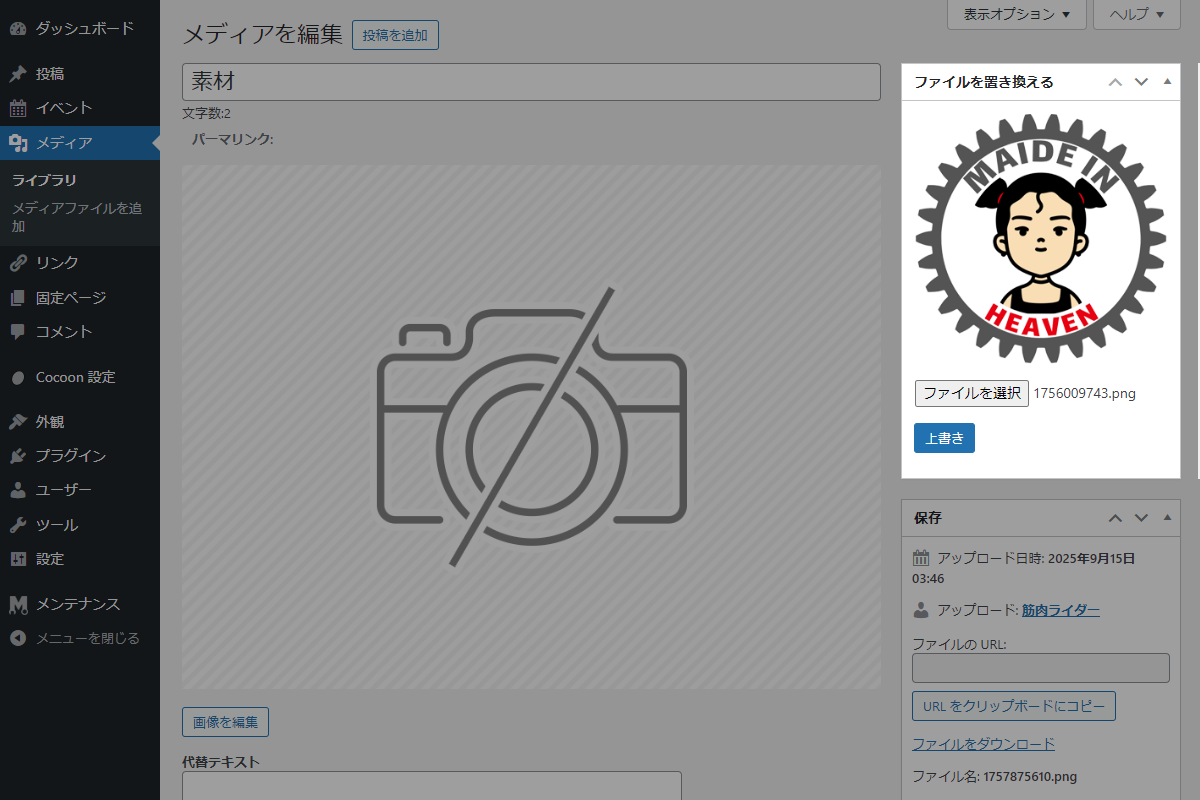
エディターで本文中の画像を個別に置き換えなくても、メディア→ライブラリ→「さらに詳細を編集 」から簡単にメディアファイルを差し替えることができます。
この記事では、この方法について説明します。
完成イメージ
実装手順
以下のコードをfunctions.phpに追加します。
// メタボックスを追加
add_action('add_meta_boxes_attachment', function () {
  add_meta_box(
    'replace_media',
    'ファイルを置き換える',
    'render_replace_media',
    'attachment',
    'side',
    'high'
  );
});


/**
 * メタボックスの入力フォームを出力
 *
 * @param WP_Post $post 添付ファイルオブジェクト
 * @return void
 */
if (!function_exists('render_replace_media')):
function render_replace_media($post) {
  $nonce = wp_create_nonce('replace_media_action');

  // 現在のファイルURLを取得
  $current_url = wp_get_attachment_url($post->ID);

  ?>
  <div class="replace-media">
    <!-- プレビュー画像 -->
    <p><img id="replace-media-preview" class="replace-media__preview" src="<?= esc_url($current_url); ?>" style="max-width:100%; height:auto; display:block; margin-bottom:10px;"></p>

    <!-- ファイル選択 -->
    <p><input type="file" id="replace-media-input" class="replace-media__input" name="file"></p>

    <!-- 上書きボタン -->
    <p><button type="button" class="button button-primary replace-media__button" id="replace-media-button" data-attachment-id="<?= esc_attr($post->ID); ?>" data-nonce="<?= esc_attr($nonce); ?>">上書き</button></p>
  </div>
  <?php
}
endif;


// 管理画面用JS・CSSを追加
add_action('admin_enqueue_scripts', function ($hook_suffix) {
  if ($hook_suffix !== 'post.php') {
    return;
  }

  // 現在の画面情報から添付ファイル編集画面であることを確認
  $screen = get_current_screen();

  if (!$screen || $screen->post_type !== 'attachment') {
    return;
  }

  ob_start();
  ?>
  jQuery(function ($) {
    // ファイル選択時にプレビューを更新
    $('#replace-media-input').on('change', function () {
      var input = this;

      if (input.files && input.files[0]) {
        var reader = new FileReader();

        reader.onload = function (e) {
          $('#replace-media-preview').attr('src', e.target.result);
        };

        reader.readAsDataURL(input.files[0]);
      }
    });

    // 「上書き」ボタンクリック時に処理
    $('#replace-media-button').on('click', function () {
      var button = $(this);
      var fileInput = $('#replace-media-input')[0];

      // ファイル未選択は処理対象外
      if (!fileInput.files.length) {
        alert('ファイルを選択してください');
        return;
      }

      // 送信用のフォームデータを設定
      var formData = new FormData();
      formData.append('action', 'replace_media');
      formData.append('attachment_id', button.data('attachment-id'));
      formData.append('replace_media_nonce', button.data('nonce'));
      formData.append('file', fileInput.files[0]);

      // Ajaxリクエストを実行
      $.ajax({
        url: ajaxurl,
        type: 'POST',
        data: formData,
        processData: false,
        contentType: false,
        success: function (response) {
          // 処理結果に応じた通知URLを設定
          var status = response.success ? 'success' : 'error';
          var msg = encodeURIComponent(response.success ? response.data.message : response.data);

          window.location.href = window.location.href.split('?')[0]
            + '?post=' + button.data('attachment-id')
            + '&action=edit&file_replace_status=' + status
            + '&file_replace_msg=' + msg;
        },
        error: function () {
          // 通信エラー時の通知URLを設定
          window.location.href = window.location.href.split('?')[0]
            + '?post=' + button.data('attachment-id')
            + '&action=edit&file_replace_status=error'
            + '&file_replace_msg=' + encodeURIComponent('通信エラー');
        }
      });
    });
  });
  <?php
  wp_add_inline_script('jquery', ob_get_clean());
});


// Ajaxアクションを追加
add_action('wp_ajax_replace_media', function () {
  if (empty($_POST['attachment_id']) || empty($_FILES['file'])) {
    wp_send_json_error('ファイルが指定されていません');
  }

  $attachment_id = intval($_POST['attachment_id']);
  $nonce = $_POST['replace_media_nonce'] ?? '';

  // noncecチェック
  if (!wp_verify_nonce($nonce, 'replace_media_action')) {
    wp_send_json_error('不正なアクセスです');
  }

  $file = $_FILES['file'];
  $file_path = get_attached_file($attachment_id);

  // 元ファイルなしは処理対象外
  if (!$file_path) {
    wp_send_json_error('元ファイルが見つかりません');
  }

  // WordPressのファイル操作・画像処理用関数を読み込み
  require_once(ABSPATH . 'wp-admin/includes/file.php');
  require_once(ABSPATH . 'wp-admin/includes/image.php');

  // アップロードファイルを一時保存
  $uploaded = wp_handle_sideload($file, ['test_form' => false]);

  if (isset($uploaded['error'])) {
    wp_send_json_error('アップロード失敗: ' . $uploaded['error']);
  }

  // 既存ファイルを削除
  if (file_exists($file_path)) {
    unlink($file_path);
  }

  // 新しいファイルに置換
  if (!rename($uploaded['file'], $file_path)) {
    wp_send_json_error('ファイル置き換えに失敗しました');
  }

  // 添付ファイルのメタデータを再生成
  $attach_data = wp_generate_attachment_metadata($attachment_id, $file_path);
  wp_update_attachment_metadata($attachment_id, $attach_data);

  // 更新結果を返却
  wp_send_json_success(['message' => 'ファイルを置き換えました']);
});


// 通知メッセージを出力
add_action('admin_notices', function () {
  if (isset($_GET['file_replace_status']) && isset($_GET['file_replace_msg'])) {
    $status = $_GET['file_replace_status'];
    $msg    = urldecode($_GET['file_replace_msg']);
    $class  = $status === 'success' ? 'notice-success' : 'notice-error';

    echo '<div class="notice ' . esc_attr($class) . ' is-dismissible"><p>' . esc_html($msg) . '</p></div>';
  }
});
さいごに
今回紹介した方法を使えば、プラグインを使わずに、メディアファイルを置き換えることができます。
管理画面でのプレビュー表示やAjaxによる非同期アップロードにより、サイト運営中でも安全に画像やその他のファイルを更新可能です。