はじめに
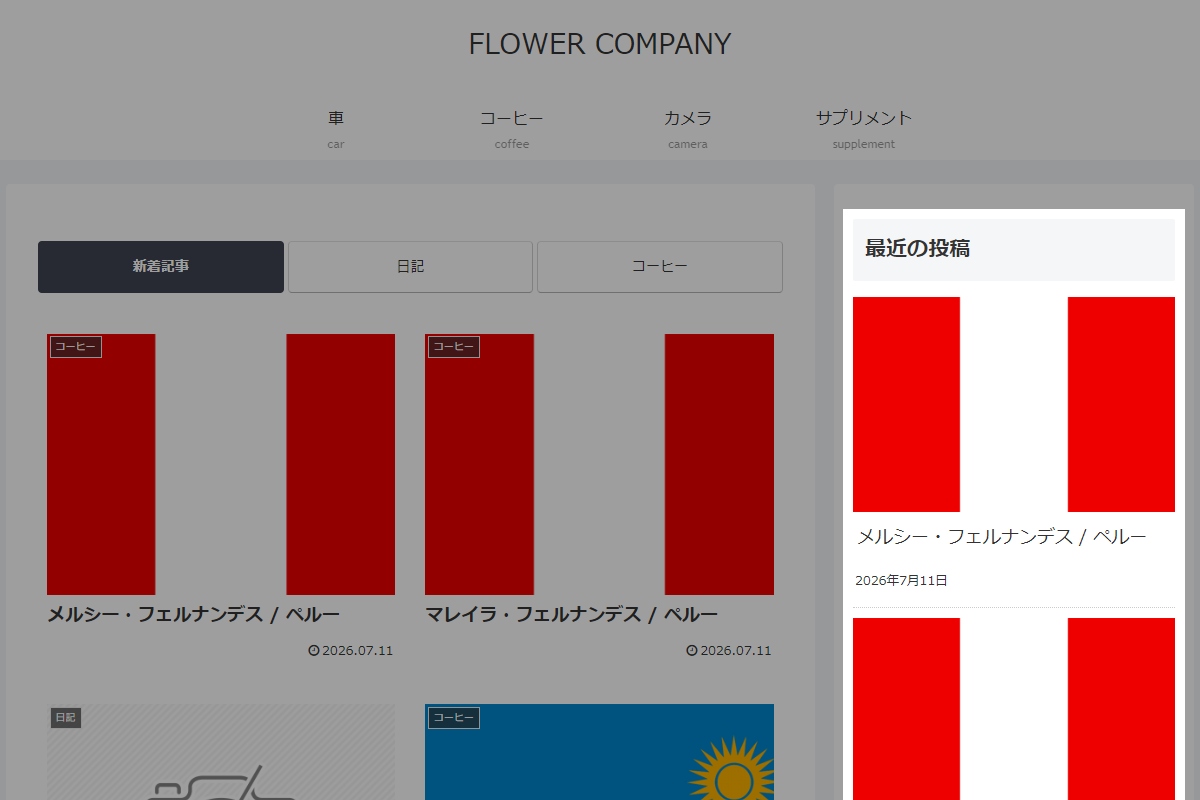
WordPress標準の「最近の投稿」ウィジェットは、標準機能のままでは記事のタイトルや日付しか表示されず、アイキャッチ画像が表示されません。
テキストばかりのリストだと、どうしてもユーザーの目を引きにくくなってしまいます。
そこで、URLからアイキャッチ画像を自動で取得し、「最新の投稿」ウィジェットにサムネイル画像として追加します。
この記事では、この方法について説明します。
完成イメージ
実装手順
以下の手順で実装します。
- ラベルPHPを追加
以下のコードをfunctions.phpに追加します。
add_filter('widget_display_callback', function ($instance, $widget, $args) { if (!isset($widget->id_base) || $widget->id_base !== 'recent-posts') { return $instance; } // 標準ウィジェットのHTMLを取得 ob_start(); $widget->widget($args, $instance); $widget_output = ob_get_clean(); $pattern = '/<li[^>]*>(.*?href=["\']([^"\']+)["\'].*?)(?=<\/li>)/is'; $widget_output = preg_replace_callback($pattern, function ($matches) { $all_content = $matches[1]; $url = $matches[2]; $post_id = url_to_postid($url); // アイキャッチ画像がある投稿のサムネイルHTMLを取得 $image_html = ''; if ($post_id && has_post_thumbnail($post_id)) { $image_html = get_the_post_thumbnail($post_id, 'thumbnail', ['class' => 'recent-posts__thumbnail']); } return '<li><div class="recent-posts__thumb">' . $image_html . '</div><div class="recent-posts__content">' . $all_content . '</div>'; }, $widget_output); // 加工済みのウィジェットを出力 echo $widget_output; // 標準ウィジェットの出力を停止 return false; }, 10, 3); - ラベルCSSを追加
以下のコードをstyle.cssに追加します。
.widget_recent_entries {
  ul li {
    border-bottom: 1px dotted #ccc;
    max-width: 400px;
    padding: 10px 0;

    &:first-child {
      padding-top: 0;
    }

    &:last-child {
      border-bottom: 0;
      padding-bottom: 0;
    }
  }
}
さいごに
今回紹介した方法を使えば、テキスト主体で地味になりがちだった「最新の投稿」ウィジェットの表示を、一気に視覚的で魅力的なコンテンツへとアップグレードできます。
他サイトの更新情報をサムネイル画像付きで表示することで、ユーザーのクリック率向上も期待できるでしょう。