はじめに
WordPressサイトを運用し、メニューやその表示位置が増えてくると、「どのメニューがどこに割り当たっているか」を一目で把握するのが難しくなります。
標準の外観→メニュー→「メニュー位置」の管理はプルダウン選択式のため操作の手間が多く、またシステム的な制約からメニュー名を英字にしている場合、後からその用途を判別するのが困難になるという課題があります。
この記事では、この方法について説明します。
目的
WordPress標準のメニュー管理画面では、サイトの機能やメニュー位置が増えるにつれて主に2つの課題が生じます。
- メニューの配置設定や全体の割り当て状況の把握が面倒
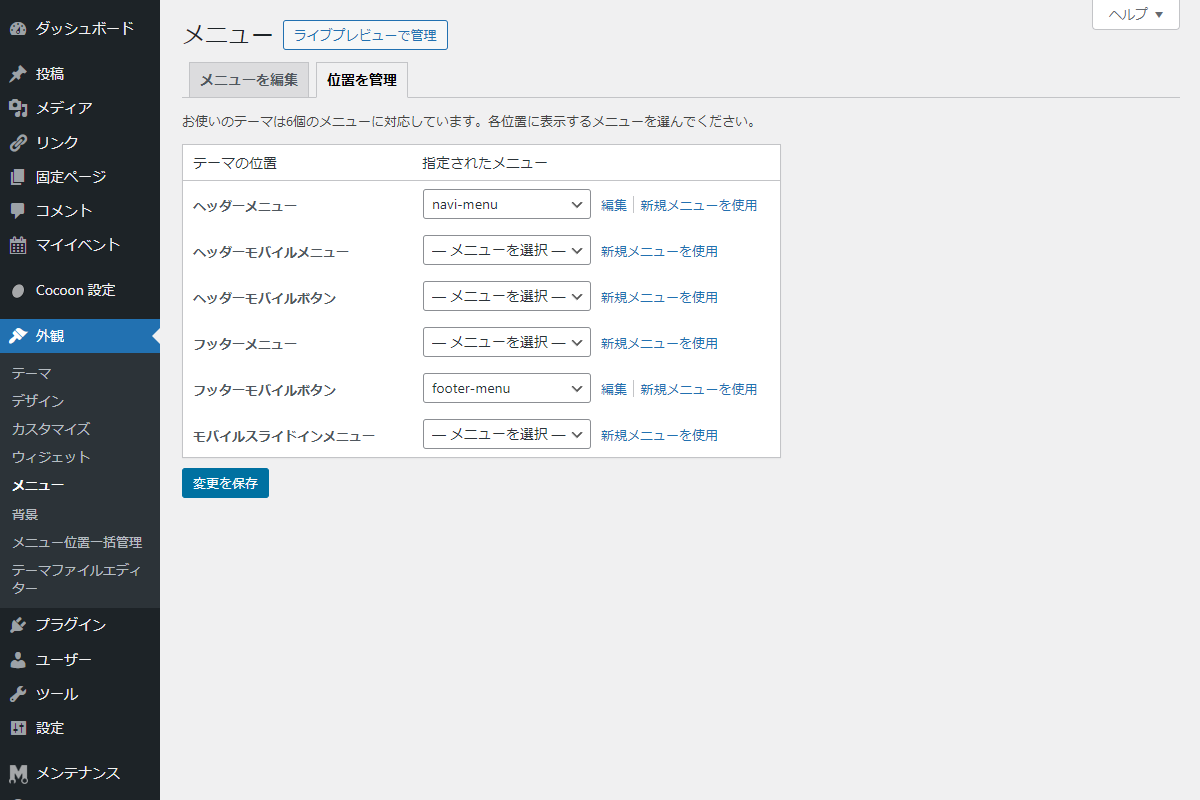
標準の「位置を管理」画面は、各位置(ロケーション)に対してプルダウンで1つずつメニューを割り当てる仕様です(図1参照)。
そのため、位置が多いテーマではスクロールと選択操作を何度も繰り返す必要があり、どの位置にどのメニューが紐付いているか全体像を一目で把握することができません。
- メニュー名を英字で管理した際に作成目的が分からなくなる
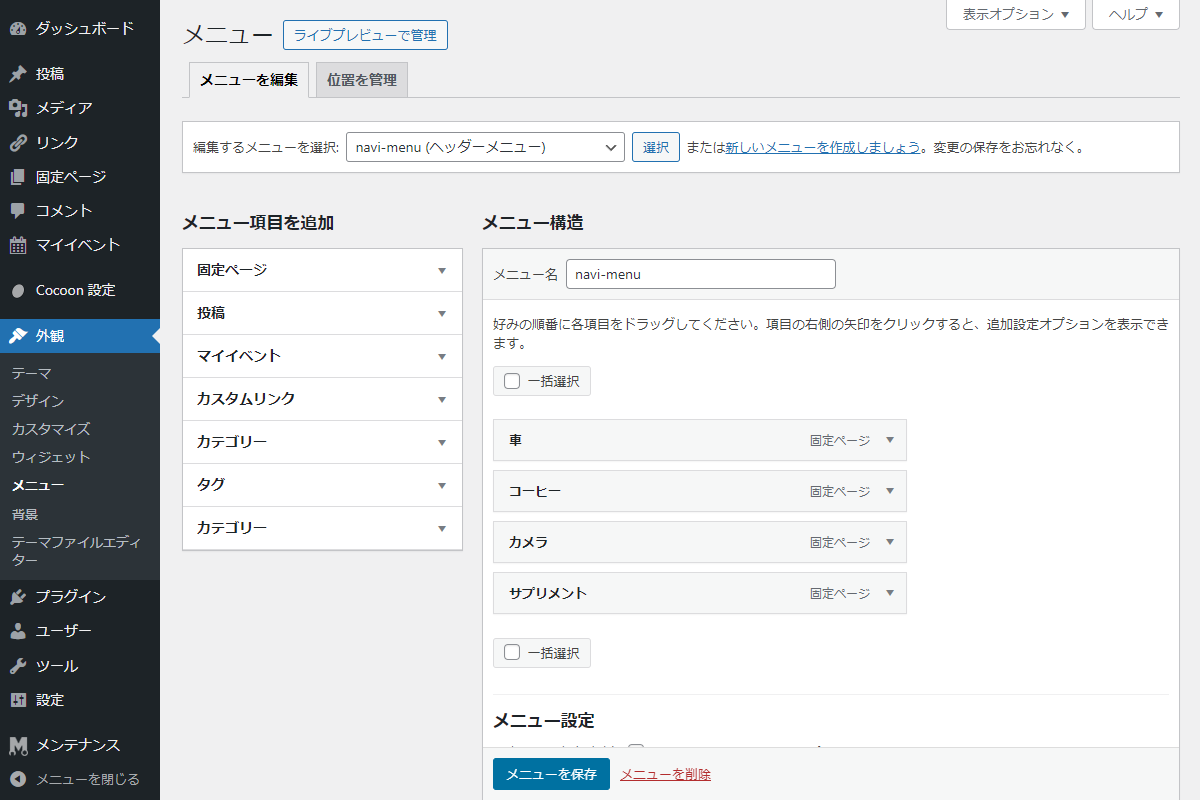
wp_nav_menu()の仕様上、メニュー名(slug)がHTMLのid属性等にそのまま反映されるケースがあるため、技術的には英字(例: navi-menu)で命名するのがセオリーです(図2参照)。
しかし、英字名だけだと「何のために作成したメニューか」用途が判断しづらく、運用面での管理が難しくなります。
今回紹介するコードを導入することで、これらの課題をスマートに解決できます。
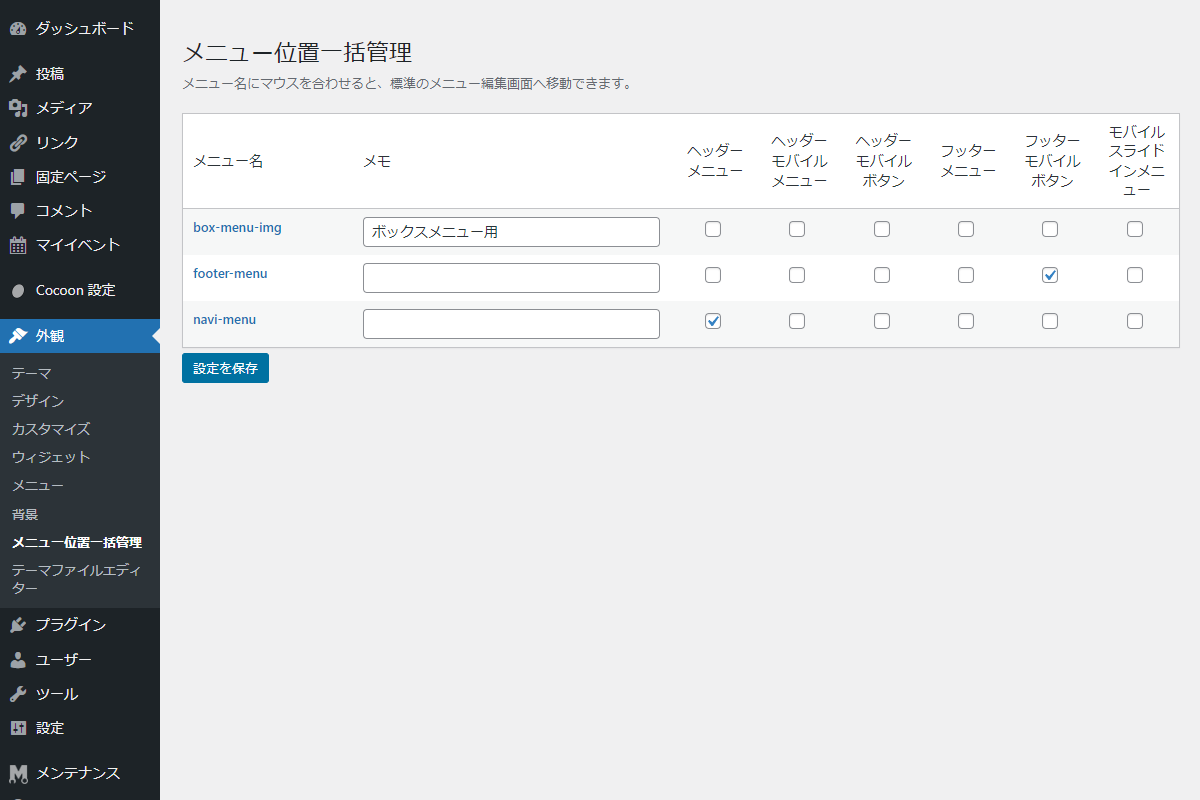
- 全メニュー(行)とテーマの表示位置(列)をマトリクス表形式で一覧表示
プルダウン操作を排除し、チェックボックスをON/OFFするだけで全位置の設定状況をまとめて確認・変更できるようになります。
- システム用「英字名」を保ちつつ、管理用「日本語メモ」を付与可能
メニュー本体はシステム上安全な英字名のままでも、専用の「メモ欄」に日本語で用途(例:ボックスメニュー用)を記録できるように改善されます。
本件は、以下で改善されています。

完成イメージ
実装手順
以下のコードをfunctions.phpに追加します。
// 管理画面にメニューを追加
add_action('admin_menu', function () {
  add_theme_page(
    'メニュー位置一括管理',
    'メニュー位置一括管理',
    'manage_options',
    'menu-matrix',
    'render_menu_matrix'
  );
});


/**
 * 管理画面ページを出力
 *
 * @return void
 */
if (!function_exists('render_menu_matrix')):
function render_menu_matrix() {
  // 登録済みメニューを取得
  $menus = wp_get_nav_menus();

  // 登録済みメニュー位置を取得
  $locations = get_registered_nav_menus();

  // メニュー位置の割り当てを取得
  $current_assignments = get_nav_menu_locations();

  ?>
  <div class="menu-matrix wrap">
    <h1>メニュー位置一括管理</h1>
    <p class="description">メニュー名にマウスを合わせると、標準のメニュー編集画面へ移動できます。</p>

    <?php settings_errors('menu_matrix_msg'); ?>

    <form method="post" action="">
      <?php wp_nonce_field('menu_matrix_action', 'menu_matrix_nonce'); ?>

      <table class="menu-matrix__table wp-list-table widefat fixed striped" style="margin-top: 20px;">
        <thead>
          <tr>
            <th class="menu-matrix__name" style="width: 150px;">メニュー名</th>
            <th class="menu-matrix__note" style="width: 300px;">メモ</th>
            <?php foreach ($locations as $loc_id => $loc_name): ?>
              <th class="menu-matrix__location" style="text-align: center; vertical-align: middle;"><span title="<?= esc_attr($loc_id); ?>"><?= esc_html($loc_name); ?></span></th>
            <?php endforeach; ?>
          </tr>
        </thead>
        <tbody>
          <?php if (!empty($menus)): ?>
            <?php foreach ($menus as $menu): ?>
              <tr>
                <td class="menu-matrix__name"><a href="<?= esc_url(admin_url('nav-menus.php?action=edit&menu=' . $menu->term_id)); ?>"><strong><?= esc_html($menu->name); ?></strong></a></td>
                <td class="menu-matrix__note"><input type="text" name="menu_matrix[notes][<?= esc_attr($menu->term_id); ?>]" value="<?= esc_attr(get_term_meta($menu->term_id, 'my_menu_matrix', true)); ?>" class="large-text" style="margin:0;"></td>
                <?php foreach ($locations as $loc_id => $loc_name): ?>
                  <td class="menu-matrix__location" style="text-align: center;"><input type="checkbox" name="menu_matrix[locations][<?= esc_attr($loc_id); ?>]" value="<?= esc_attr($menu->term_id); ?>" class="menu-matrix__checkbox" data-location="<?= esc_attr($loc_id); ?>" <?php checked(isset($current_assignments[$loc_id]) && intval($current_assignments[$loc_id]) === intval($menu->term_id)); ?>></td>
                <?php endforeach; ?>
              </tr>
            <?php endforeach; ?>
          <?php else: ?>
            <tr>
              <td colspan="<?= count($locations) + 2; ?>">メニューがありません。</td>
            </tr>
          <?php endif; ?>
        </tbody>
      </table>

      <?php submit_button('設定を保存'); ?>
    </form>
  </div>

  <script>
  jQuery(function ($) {
    $('.menu-matrix__checkbox').on('change', function () {
      if ($(this).prop('checked')) {
        $('.menu-matrix__checkbox[data-location="' + $(this).data('location') + '"]').not(this).prop('checked', false);
      }
    });
  });
  </script>
  <?php
}
endif;


// 管理画面からの設定データ更新
add_action('admin_init', function () {
  // nonceチェック
  if (!isset($_POST['menu_matrix_nonce']) || !wp_verify_nonce($_POST['menu_matrix_nonce'], 'menu_matrix_action')) {
    return;
  }

  // メニュー位置を取得
  $menu_matrix = isset($_POST['menu_matrix']) ? (array) $_POST['menu_matrix'] : [];

  // 登録されているメニュー位置を取得
  $registered_locations = get_registered_nav_menus();

  $update_locations = [];

  // メニュー位置を設定
  $new_locations = isset($menu_matrix['locations']) ? (array) $menu_matrix['locations'] : [];

  foreach ($registered_locations as $loc_id => $loc_name) {
    if (!isset($new_locations[$loc_id])) {
      continue;
    }

    $update_locations[$loc_id] = intval($new_locations[$loc_id]);
  }

  set_theme_mod('nav_menu_locations', $update_locations);

  // メニュー用メタを設定
  $menu_notes = isset($menu_matrix['notes']) ? (array) $menu_matrix['notes'] : [];

  foreach ($menu_notes as $menu_id => $note) {
    update_term_meta(intval($menu_id), 'my_menu_matrix', sanitize_text_field($note));
  }

  // 保存完了メッセージを登録
  add_settings_error('menu_matrix_msg', 'settings_updated', '設定を保存しました。', 'updated');
});
さいごに
今回紹介した方法を使えば、英字での適切なメニュー命名を維持しつつ、管理者にとっての分かりやすさと操作のスピードを劇的に向上させることができます。
特に大規模なサイトや、複数人で運用・引き継ぎを行うプロジェクトにおいて、この機能は非常に強力なツールとなるでしょう。