はじめに
以下の記事では、SWELL風のフルワイドブロックの作り方を紹介しました。

そこで、今回はそれを発展させて、上下に波線を付けて全幅表示する独自ブロックを追加します。
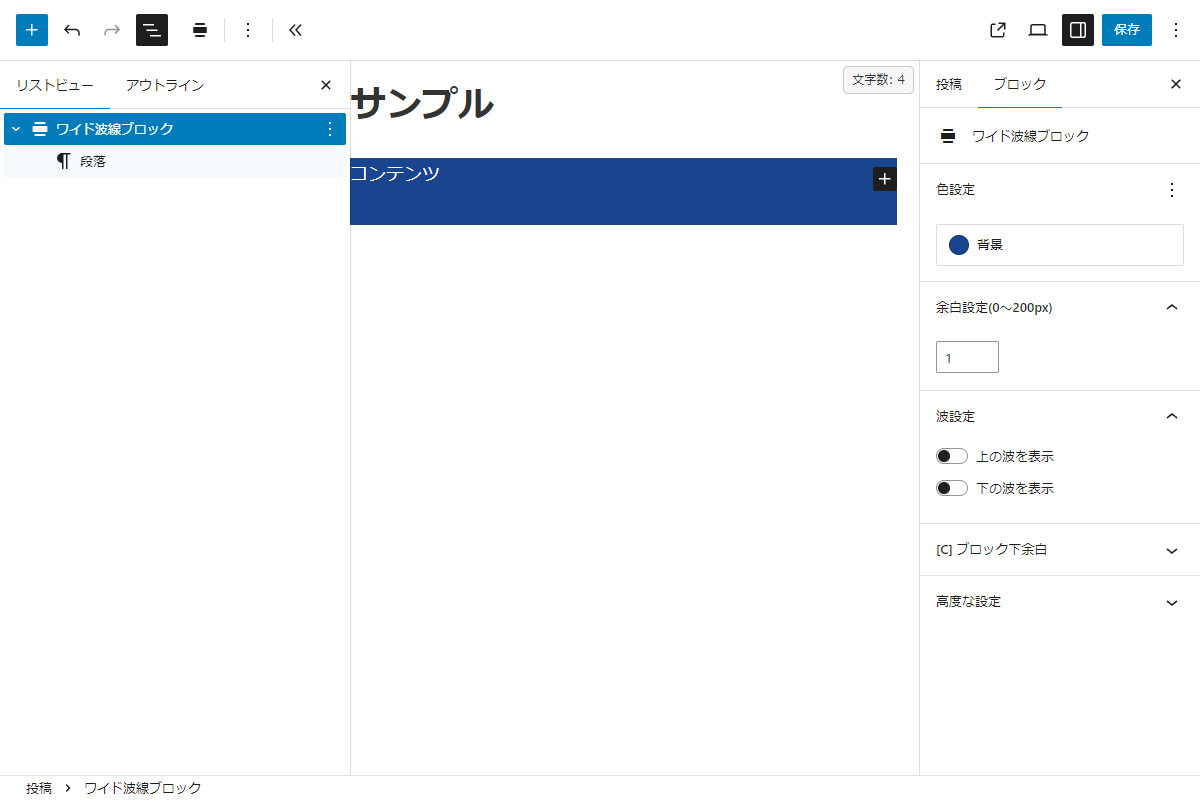
このブロックは、背景色・余白・波線の表示/非表示を Gutenberg エディターで設定できます。
この記事では、この方法について説明します。
完成イメージ
実装手順
以下のコードをfunctions.phpに追加します。
// ブロックを登録
add_action('init', function () {
  ob_start();
  ?>
  .body {
    overflow-x: clip;
  }

  section.wide-wave .wide-wave__wave {
    height: 50px;
    margin-left: calc(50% - 50vw);
    margin-right: calc(50% - 50vw);
    overflow: hidden;
    width: 100vw;
  }

  @media (width <= 480px) {
    section.wide-wave .wide-wave__wave {
      height: 30px;
    }
  }

  section.wide-wave .wide-wave__wave svg {
    display: block;
    height: 100%;
    width: 100%;
  }

  .wide-wave__content {
    margin: 0 calc(50% - 50vw);
    padding: 0 calc(50vw - 50%);
    position: relative;
    z-index: 1;
  }

  .body .wide-wave__content > *:last-child {
    margin-bottom: 0;
  }

  .wide-wave__content .block-editor-block-list__layout > *:last-child {
    margin-bottom: 0;
  }
  <?php

  wp_register_style($handle, false);
  wp_add_inline_style($handle, ob_get_clean());

  ob_start();
  ?>
  (function (wp) {
    const { registerBlockType } = wp.blocks;
    const { InnerBlocks, InspectorControls, PanelColorSettings } = wp.blockEditor || wp.editor;
    const { PanelBody, ToggleControl, PanelRow, TextControl } = wp.components;
    const { createElement: el } = wp.element;

    registerBlockType('custom/wide-wave', {
      title: 'ワイド波線ブロック',
      icon: 'align-wide',
      category: 'layout',
      supports: {
        customClassName: true,
        align: false
      },
      attributes: {
        backgroundColor: { type: 'string', default: '#f0f0f0' },
        showUpWave:      { type: 'boolean', default: true },
        showLowWave:     { type: 'boolean', default: true },
        paddingTop:      { type: 'string', default: '0px' },
        paddingBottom:   { type: 'string', default: '0px' },
      },
      /**
       * エディター描画コンポーネント
       *
       * @param {Object} props ブロックのProps
       * @return {import('react').ReactElement} Reactエレメント
       */
      edit: function (props) {
        const { attributes, setAttributes } = props;

        const waveSettings = el(PanelBody, { title: '波設定', initialOpen: false },
          el(ToggleControl, {
            label: '上の波を表示',
            checked: attributes.showUpWave,
            onChange: (v) => setAttributes({ showUpWave: v })
          }),
          el(ToggleControl, {
            label: '下の波を表示',
            checked: attributes.showLowWave,
            onChange: (v) => setAttributes({ showLowWave: v })
          })
        );

        const currentPaddingValue = attributes.paddingTop ? attributes.paddingTop.replace('px', '') : '';

        const paddingSettings = el(PanelBody, {
          title: '余白設定(0~200px)',
          initialOpen: true
        },
          el(PanelRow, null,
            el(TextControl, {
              type: 'number',
              min: 0,
              max: 200,
              label: '',
              hideLabelFromVision: true,
              value: currentPaddingValue,
              onChange: (v) => {
                const numValue = parseInt(v, 10);
                let paddedValue = '';

                if (v === '' || isNaN(numValue) || numValue < 0 || numValue > 200) {
                  if (v === '') {
                    paddedValue = '';
                  } else {
                    return;
                  }
                } else {
                  paddedValue = numValue + 'px';
                }

                setAttributes({
                  paddingTop: paddedValue,
                  paddingBottom: paddedValue,
                });
              },
              style: { flexGrow: 1 }
            })
          )
        );

        // 上波 SVG
        const upWave = attributes.showUpWave && el('div', { className: 'wide-wave__wave wide-wave__wave--up' },
          el('svg', { viewBox: '0 0 2000 100', preserveAspectRatio: 'none' },
            el('path', { d: 'M0 100V48.2587C142.87 32.1725 247.56 0 500.63 0C753.69 0 1234.81 49.2537 1500.38 49.2537C1755.94 49.2537 1869.47 18.0763 2000 3.48255V100H0Z', fill: attributes.backgroundColor })
          )
        );

        // 下波 SVG
        const lowWave = attributes.showLowWave && el('div', { className: 'wide-wave__wave wide-wave__wave--low' },
          el('svg', { viewBox: '0 0 2000 100', preserveAspectRatio: 'none' },
            el('path', { d: 'M2000 0V51.7413C1857.13 67.8275 1752.44 100 1499.37 100C1246.31 100 765.191 50.7463 499.625 50.7463C244.061 50.7463 130.533 81.9237 0 96.5174V0H2000Z', fill: attributes.backgroundColor })
          )
        );

        const contentStyle = {
          backgroundColor: attributes.backgroundColor,
          paddingTop: attributes.paddingTop,
          paddingBottom: attributes.paddingBottom
        };

        return el('section', { className: 'wide-wave' },
          el(InspectorControls, null,
            el(PanelColorSettings, {
              title: '色設定',
              colorSettings: [{
                value: attributes.backgroundColor,
                onChange: (color) => setAttributes({ backgroundColor: color }),
                label: '背景'
              }]
            }),
            paddingSettings,
            waveSettings
          ),
          upWave,
          el('div', { className: 'wide-wave__content', style: contentStyle },
            el(InnerBlocks, { templateLock: false })
          ),
          lowWave
        );
      },
      /**
       * 保存用コンポーネント
       *
       * @return {import('react').ReactElement} Reactエレメント
       */
      save: function () {
        return el(InnerBlocks.Content);
      }
    });
  })(window.wp);
  <?php

  $handle = 'wide-wave';

  wp_register_script($handle, false, ['wp-blocks', 'wp-element', 'wp-i18n', 'wp-components', 'wp-block-editor'], false, true);
  wp_add_inline_script($handle, ob_get_clean());

  register_block_type('custom/wide-wave', [
    'render_callback' => 'render_wide_wave',
    'attributes'      => [
      'backgroundColor' => ['type' => 'string', 'default' => '#f0f0f0'],
      'showUpWave'      => ['type' => 'boolean', 'default' => true],
      'showLowWave'     => ['type' => 'boolean', 'default' => true],
      'paddingTop'      => ['type' => 'string', 'default' => '0px'],
      'paddingBottom'   => ['type' => 'string', 'default' => '0px'],
    ],
    'style'         => $handle,
    'editor_script' => $handle,
  ]);
});


/**
 * ワイド波線ブロックを描画
 *
 * @param array $attributes ブロック属性
 * @param string $content InnerBlocksでネストされたコンテンツ
 * @return string HTML
 */
if (!function_exists('render_wide_wave')):
function render_wide_wave($attributes, $content) {
  $bg      = !empty($attributes['backgroundColor']) ? esc_attr($attributes['backgroundColor']) : '#f0f0f0';
  $showUp  = !empty($attributes['showUpWave']);
  $showLow = !empty($attributes['showLowWave']);

  $paddingTop    = !empty($attributes['paddingTop']) ? 'padding-top: ' . esc_attr($attributes['paddingTop']) . ';' : '';
  $paddingBottom = !empty($attributes['paddingBottom']) ? 'padding-bottom: ' . esc_attr($attributes['paddingBottom']) . ';' : '';
  $contentStyle  = "background-color:{$bg}; {$paddingTop} {$paddingBottom}";

  ob_start();
  ?>
  <section class="wide-wave">

    <?php if ($showUp) : ?>
      <div class="wide-wave__wave wide-wave__wave--up">
        <svg viewBox="0 0 2000 100" preserveAspectRatio="none">
          <path d="M0 100V48.2587C142.87 32.1725 247.56 0 500.63 0C753.69 0 1234.81 49.2537 1500.38 49.2537C1755.94 49.2537 1869.47 18.0763 2000 3.48255V100H0Z" fill="<?= $bg; ?>"></path>
        </svg>
      </div>
    <?php endif; ?>

    <div class="wide-wave__content" style="<?= $contentStyle; ?>">
      <?= $content; ?>
    </div>

    <?php if ($showLow) : ?>
      <div class="wide-wave__wave wide-wave__wave--low">
        <svg viewBox="0 0 2000 100" preserveAspectRatio="none">
          <path d="M2000 0V51.7413C1857.13 67.8275 1752.44 100 1499.37 100C1246.31 100 765.191 50.7463 499.625 50.7463C244.061 50.7463 130.533 81.9237 0 96.5174V0H2000Z" fill="<?= $bg; ?>"></path>
        </svg>
      </div>
    <?php endif; ?>

  </section>
  <?php
  return ob_get_clean();
}
endif;
さいごに
今回紹介した方法を使えば、上下に波線を付けた SWELL 風フルワイドセクションを、Gutenbergエディターのブロックとして柔軟に実装できます。
背景色や余白、波線の有無を直感的に変更できるため、コンテンツに合わせた多彩なデザインが可能になります。