はじめに
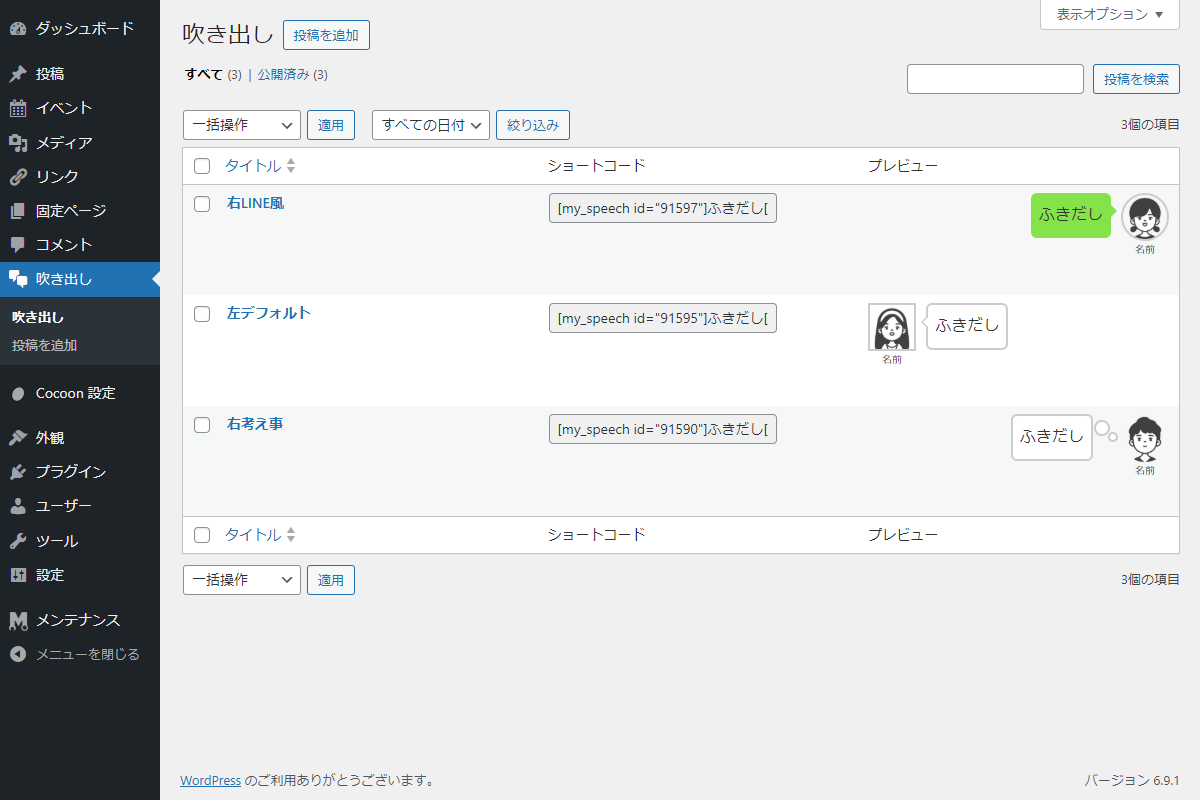
Cocoonの吹き出し機能(Cocoon設定→吹き出し)は独自画面と独自テーブル(wp_cocoon_speech_balloons)で管理されています。

一方、旧SWELLのふきだしセットはカスタム投稿タイプで、WordPress標準の投稿一覧などから管理されています。

そこで、吹き出し機能もカスタム投稿タイプ(speech_balloon)として、WordPress標準で管理するように変更します。
また吹き出し用のショートコードを追加します。
この記事では、この方法について説明します。
完成イメージ

使用方法
以下にショートコードを示します。
[my_speech id=1]ふきだし[/my_speech]| オプション | 説明 | 値 | 初期値 |
|---|---|---|---|
| id | 吹き出しID(必須) | 0 |
実装手順
以下のコードをfunctions.phpに追加します。
/**
 * カスタム投稿タイプから吹き出しデータを取得
 *
 * @param int $post_id 投稿ID
 * @return object|false 吹き出しデータ。投稿が存在しない場合はfalse
 */
if (!function_exists('get_my_speech_record_from_cpt')):
function get_my_speech_record_from_cpt($post_id) {
  $post = get_post($post_id);

  if (!$post) {
    return false;
  }

  return (object) [
    'id'        => $post->ID,
    'title'     => $post->post_title,
    'name'      => get_post_meta($post->ID, 'my_sb_name',      true),
    'icon'      => get_post_meta($post->ID, 'my_sb_icon',      true),
    'style'     => get_post_meta($post->ID, 'my_sb_style',     true) ?: 'stn',
    'position'  => get_post_meta($post->ID, 'my_sb_position',  true) ?: 'l',
    'iconstyle' => get_post_meta($post->ID, 'my_sb_iconstyle', true) ?: 'cb',
  ];
}
endif;


/**
 * メタボックスの入力フォームを出力
 *
 * @param WP_Post $post 投稿オブジェクト
 * @return void
 */
if (!function_exists('render_speech_balloon')):
function render_speech_balloon($post) {
  // 投稿に紐づく各種カスタムフィールドのメタデータを取得
  $name      = get_post_meta($post->ID, 'my_sb_name',      true);
  $icon      = get_post_meta($post->ID, 'my_sb_icon',      true);
  $style     = get_post_meta($post->ID, 'my_sb_style',     true) ?: 'stn';
  $position  = get_post_meta($post->ID, 'my_sb_position',  true) ?: 'l';
  $iconstyle = get_post_meta($post->ID, 'my_sb_iconstyle', true) ?: 'cb';

  wp_nonce_field('speech_balloon_action', 'speech_balloon_nonce');
  ?>
  <table class="form-table">
    <tbody>

      <!-- 名前 -->
      <tr>
        <th><label for="sb_name">名前</label></th>
        <td>
          <input type="text" name="sb_name" id="sb_name" value="<?= esc_attr($name); ?>" class="regular-text">
        </td>
      </tr>

      <!-- アイコン画像 -->
      <tr>
        <th><label>アイコン画像</label></th>
        <td>
          <input type="hidden" name="sb_icon" id="sb_icon" value="<?= esc_url($icon); ?>">
          <button type="button" class="button sb-select-image">画像を選択</button>
          <button type="button" class="button sb-remove-image">削除</button>
          <div class="sb-icon-preview" style="margin-top:8px;">
            <?php if ($icon) { ?>
              <img src="<?= esc_url($icon); ?>" style="max-width:96px;height:auto;">
            <?php } ?>
          </div>
        </td>
      </tr>

      <!-- 吹き出しスタイル -->
      <tr>
        <th><label for="sb_style">吹き出しスタイル</label></th>
        <td>
          <select name="sb_style" id="sb_style">
            <option value="stn" <?php selected($style, 'stn'); ?>>デフォルト</option>
            <option value="flat" <?php selected($style, 'flat'); ?>>フラット</option>
            <option value="line" <?php selected($style, 'line'); ?>>LINE風</option>
            <option value="think" <?php selected($style, 'think'); ?>>考え事</option>
          </select>
        </td>
      </tr>

      <!-- 人物位置 -->
      <tr>
        <th><label for="sb_position">人物位置</label></th>
        <td>
          <select name="sb_position" id="sb_position">
            <option value="l" <?php selected($position, 'l'); ?>>左</option>
            <option value="r" <?php selected($position, 'r'); ?>>右</option>
          </select>
        </td>
      </tr>

      <!-- アイコンスタイル -->
      <tr>
        <th><label for="sb_iconstyle">アイコンスタイル</label></th>
        <td>
          <select name="sb_iconstyle" id="sb_iconstyle">
            <option value="sn" <?php selected($iconstyle, 'sn'); ?>>四角(枠線なし)</option>
            <option value="sb" <?php selected($iconstyle, 'sb'); ?>>四角(枠線あり)</option>
            <option value="cn" <?php selected($iconstyle, 'cn'); ?>>丸(枠線なし)</option>
            <option value="cb" <?php selected($iconstyle, 'cb'); ?>>丸(枠線あり)</option>
          </select>
        </td>
      </tr>

    </tbody>
  </table>
  <?php
}
endif;


// カスタム投稿タイプを追加
add_action('init', function () {
  register_post_type('my_speech_balloon', [
    'label'         => '吹き出し',
    'menu_icon'     => 'dashicons-format-chat',
    'menu_position' => 25,
    'public'        => false,
    'show_in_menu'  => true,
    'show_in_rest'  => true,
    'show_ui'       => true,
    'supports'      => ['title'],
  ]);
});


// メタボックスを追加
add_action('add_meta_boxes', function () {
  add_meta_box(
    'speech_balloon',
    '吹き出し設定',
    'render_speech_balloon',
    'my_speech_balloon',
    'normal',
    'default'
  );
});


// 管理画面用JS・CSSを追加
add_action('admin_enqueue_scripts', function ($hook_suffix) {
  $screen = get_current_screen();

  if (!in_array($hook_suffix, ['post-new.php', 'post.php'], true) || !$screen || $screen->post_type !== 'my_speech_balloon') {
    return;
  }

  ob_start();
  ?>
  jQuery(function ($) {
    let frame;

    // 画像選択ボタンがクリックされた場合
    $('.sb-select-image').on('click', function (e) {
      e.preventDefault();

      if (frame) {
        frame.open();
        return;
      }

      frame = wp.media({
        title: '画像を選択',
        button: { text: 'この画像を使用' },
        multiple: false
      });

      // メディアライブラリで画像が選択された場合
      frame.on('select', function () {
        const attachment = frame.state().get('selection').first().toJSON();
        $('#sb_icon').val(attachment.url);
        $('.sb-icon-preview').html('<img src="' + attachment.url + '" style="max-width:96px;height:auto;">');
      });

      frame.open();
    });

    // 削除ボタンがクリックされた場合
    $('.sb-remove-image').on('click', function () {
      $('#sb_icon').val('');
      $('.sb-icon-preview').html('');
    });
  });
  <?php

  wp_enqueue_media();
  wp_add_inline_script('jquery', ob_get_clean());
});


// 投稿データを保存
add_action('save_post_my_speech_balloon', function ($post_id) {
  // nonceチェック
  if (!isset($_POST['speech_balloon_nonce']) || !wp_verify_nonce($_POST['speech_balloon_nonce'], 'speech_balloon_action')) {
    return;
  }

  // 自動保存チェック
  if (defined('DOING_AUTOSAVE') && DOING_AUTOSAVE) {
    return;
  }

  // リビジョンは除外
  if (wp_is_post_revision($post_id)) {
    return;
  }

  // 権限チェック
  if (!current_user_can('edit_post', $post_id)) {
    return;
  }

  // 入力された各ポストメタデータをサニタイズしてデータベースに保存
  update_post_meta($post_id, 'my_sb_name',      sanitize_text_field($_POST['sb_name']      ?? ''));
  update_post_meta($post_id, 'my_sb_icon',      esc_url_raw($_POST['sb_icon']              ?? ''));
  update_post_meta($post_id, 'my_sb_style',     sanitize_text_field($_POST['sb_style']     ?? 'stn'));
  update_post_meta($post_id, 'my_sb_position',  sanitize_text_field($_POST['sb_position']  ?? 'l'));
  update_post_meta($post_id, 'my_sb_iconstyle', sanitize_text_field($_POST['sb_iconstyle'] ?? 'cb'));
});


// ショートコードを追加
add_shortcode('my_speech', function ($atts, $content = null) {
  $atts = shortcode_atts([
    'id'        => 0,
    'name'      => '',
    'style'     => '',
    'position'  => '',
    'iconstyle' => '',
    'icon'      => '',
  ], $atts);

  // 指定された投稿IDから吹き出しデータを取得
  $r = get_my_speech_record_from_cpt(intval($atts['id']));

  // レコードが存在しない場合は空文字を返す
  if (!$r) {
    return '';
  }

  // ショートコードで指定された値があれば上書き
  $keys = ['name', 'style', 'position', 'iconstyle', 'icon'];

  foreach ($keys as $key) {
    if (!empty($atts[$key])) {
      $r->$key = $atts[$key];
    }
  }

  ob_start();
  generate_speech_balloon_tag($r, do_shortcode($content));

  return ob_get_clean();
});


// 管理画面一覧にカラムを追加
add_filter('manage_edit-my_speech_balloon_columns', function ($columns) {
  $new = [];

  foreach ($columns as $key => $label) {
    $new[$key] = $label;

    if ($key === 'title') {
      $new['speech_shortcode'] = 'ショートコード';
      $new['speech_preview']   = 'プレビュー';
    }
  }

  return $new;
});


// 管理画面一覧のカラムにデータを表示
add_action('manage_my_speech_balloon_posts_custom_column', function ($column, $post_id) {
  switch ($column) {
    case 'speech_shortcode':
      $shortcode = '[my_speech id="' . $post_id . '"]ふきだし[/my_speech]';
      echo '<input type="text" size="28" value="' . esc_attr($shortcode) . '" readonly onclick="this.select();">';
      break;

    case 'speech_preview':
      $iframe_src = admin_url('admin-ajax.php?action=speech_preview&post_id=' . $post_id);
      echo '<iframe src="' . esc_url($iframe_src) . '" style="width:100%;height:90px;border:none;"></iframe>';
      break;
  }
}, 10, 2);


// Ajaxアクションを追加
add_action('wp_ajax_speech_preview', function () {
  if (!isset($_GET['post_id'])) {
    wp_die();
  }

  // パラメータから投稿IDと吹き出しデータを取得
  $post_id = intval($_GET['post_id']);
  $record  = get_my_speech_record_from_cpt($post_id);

  if (!$record) {
    wp_die();
  }

  $theme_css = get_template_directory_uri() . '/style.css';
  ?>
  <!DOCTYPE html>
  <html>
  <head>
    <link rel="stylesheet" href="<?= esc_url($theme_css); ?>">
    <style>body{background-color: transparent;}</style>
  </head>
  <body>
    <?php generate_speech_balloon_tag($record, 'ふきだし'); ?>
  </body>
  </html>
  <?php
  exit;
});
参考:「吹き出し」ブロックの注意点
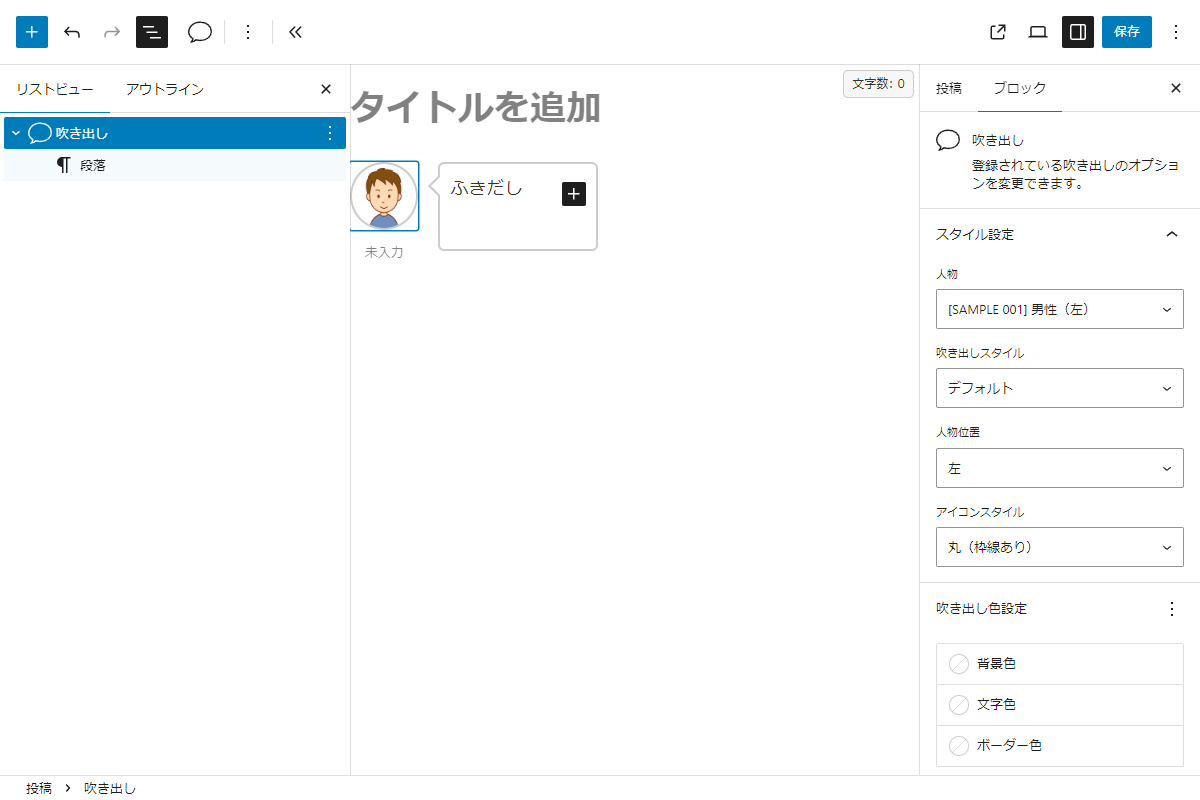
例えば、Cocoon設定→吹き出しで作成した人物「SAMPLE 001」を本文に挿入します。
そのあと、Cocoon設定→吹き出しのアイコン画像などを変更しても、すでに本文にHTMLタグとして埋め込まれ変更内容は反映されません。
<!-- wp:cocoon-blocks/balloon-ex-box-1 {"name":"名前","index":0,"id":"1","icon":"https://example.com/wp-content/themes/cocoon-master/images/man.png"} -->
<div class="wp-block-cocoon-blocks-balloon-ex-box-1 speech-wrap sb-id-1 sbs-stn sbp-l sbis-cb cf block-box not-nested-style cocoon-block-balloon">
  <div class="speech-person">
    <figure class="speech-icon">
      <img src="https://example.com/wp-content/themes/cocoon-master/images/man.png" alt="名前" class="speech-icon-image"/>
    </figure>
    <div class="speech-name">名前</div>
  </div>
  <div class="speech-balloon">
    <!-- wp:paragraph -->
    <p>吹き出し</p>
    <!-- /wp:paragraph -->
  </div>
</div>
<!-- /wp:cocoon-blocks/balloon-ex-box-1 -->
変更を反映させたい場合は、個別に投稿を編集するか、プラグイン「Search Regex」などで置き換える必要があります。
これはクラシックエディター時代の名残で、本文中に HTML タグとして展開される仕様です。
参考:独自の「吹き出し」ブロックに設定を反映させる方法
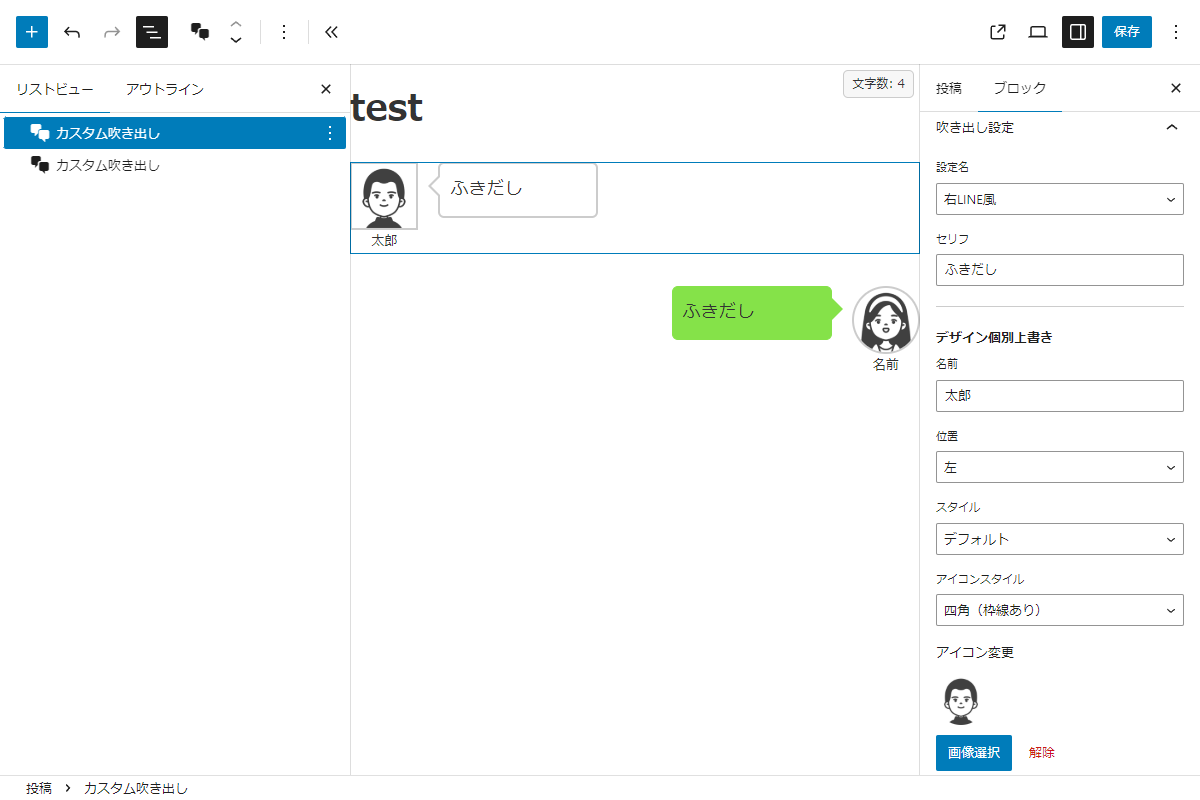
独自の「吹き出し」ブロックを追加します。
従来の方法と異なり、HTMLタグとして本文に埋め込まれるのではなく、吹き出しの設定内容がブロックのパラメータとして保存されます。
<!-- wp:custom/speech-balloon {"postId":91604,"content":"ふきだし","name":"太郎","style":"stn","position":"l","iconstyle":"sb","icon":"http://example.com/wp-content/uploads/2025/10/1760976954.png"} /-->そのため、吹き出し設定の値をブロックに直接反映でき、さらにサイドパネルで個別に設定した値がある場合はそちらが優先されます。
完成イメージ
実装手順
以下のコードを追加します。
- ラベルPHPを追加(吹き出し一覧)
前述のコードをfunctions.phpに追加します。
吹き出し一覧を作成する部分は共通です。 - ラベルPHPを追加(ブロックを追加)
以下のコードをfunctions.phpに追加します。
// エディター用JS・CSSを追加
add_action('enqueue_block_editor_assets', function () {
  ob_start();
  ?>
  (function() {
    const { registerBlockType } = wp.blocks;
    const { InspectorControls, MediaUpload, MediaUploadCheck } = wp.blockEditor;
    const { PanelBody, SelectControl, TextControl, Button } = wp.components;
    const { useSelect } = wp.data;
    const { createElement, Fragment } = wp.element;
    const ServerSideRender = wp.serverSideRender;

    registerBlockType('custom/speech-balloon', {
      title: 'カスタム吹き出し',
      icon: 'format-chat',
      category: 'widgets',
      attributes: {
        postId: { type: 'number', default: 0 },
        content: { type: 'string', default: 'セリフを入力' },
        name: { type: 'string', default: '' },
        style: { type: 'string', default: '' },
        position: { type: 'string', default: '' },
        iconstyle: { type: 'string', default: '' },
        icon: { type: 'string', default: '' },
      },
      edit({ attributes, setAttributes }) {
        const { postId, content, name, style, position, iconstyle, icon } = attributes;

        const speechPosts = useSelect((select) => {
          return select('core').getEntityRecords('postType', 'my_speech_balloon', { per_page: -1 }) || [];
        }, []);

        const options = [{ label: '-- 選択してください --', value: 0 }];
        if (speechPosts) {
          speechPosts.forEach(post => {
            options.push({ label: post.title.rendered, value: post.id });
          });
        }

        return createElement(
          Fragment,
          null,
          createElement(InspectorControls, null,
            createElement(PanelBody, { title: '吹き出し設定', initialOpen: true },
              createElement(SelectControl, {
                label: '設定名',
                value: postId,
                options: options,
                onChange: (val) => setAttributes({ postId: parseInt(val) })
              }),
              createElement(TextControl, {
                label: 'セリフ',
                value: content,
                onChange: (val) => setAttributes({ content: val })
              }),
              createElement('hr', { style: { margin: '20px 0', border: 'none', borderTop: '1px solid #ccc' } }),
              createElement('p', { style: { fontWeight: 'bold', marginBottom: '10px' } }, 'デザイン個別上書き'),
              createElement(TextControl, {
                label: '名前',
                placeholder: '未入力時は設定に従う',
                value: name,
                onChange: (val) => setAttributes({ name: val })
              }),
              createElement(SelectControl, {
                label: '位置',
                value: position,
                options: [
                  { label: '設定に従う', value: '' },
                  { label: '左', value: 'l' },
                  { label: '右', value: 'r' }
                ],
                onChange: (val) => setAttributes({ position: val })
              }),
              createElement(SelectControl, {
                label: 'スタイル',
                value: style,
                options: [
                  { label: '設定に従う', value: '' },
                  { label: 'デフォルト', value: 'stn' },
                  { label: 'フラット', value: 'flat' },
                  { label: 'LINE風', value: 'line' },
                  { label: '考え事', value: 'think' }
                ],
                onChange: (val) => setAttributes({ style: val })
              }),
              createElement(SelectControl, {
                label: 'アイコンスタイル',
                value: iconstyle,
                options: [
                  { label: '設定に従う', value: '' },
                  { label: '四角(枠線なし)', value: 'sn' },
                  { label: '四角(枠線あり)', value: 'sb' },
                  { label: '丸(枠線なし)', value: 'cn' },
                  { label: '丸(枠線あり)', value: 'cb' }
                ],
                onChange: (val) => setAttributes({ iconstyle: val })
              }),
              createElement('p', { style: { marginTop: '15px', fontSize: '13px' } }, 'アイコン変更'),
              createElement(MediaUploadCheck, null,
                createElement(MediaUpload, {
                  onSelect: (m) => setAttributes({ icon: m.url }),
                  allowedTypes: ['image'],
                  value: icon,
                  render: ({ open }) => createElement('div', null,
                    icon && createElement('img', {
                      src: icon,
                      style: { width: '50px', marginBottom: '10px', display: 'block', borderRadius: '50%' }
                    }),
                    createElement(Button, { isPrimary: true, onClick: open }, '画像選択'),
                    icon && createElement(Button, {
                      isDestructive: true,
                      onClick: () => setAttributes({ icon: '' }),
                      style: { marginLeft: '5px' }
                    }, '解除')
                  )
                })
              )
            )
          ),
          postId === 0
            ? createElement('div', {
                style: { padding: '20px', border: '1px dashed #ccc', textAlign: 'center', background: '#f9f9f9' }
              }, '右パネルからキャラクターを選択してください')
            : createElement(ServerSideRender, {
                block: 'custom/speech-balloon',
                attributes: attributes
              })
        );
      },
      save() {
        return null;
      }
    });
  })();
  <?php

  $handle = 'speech-balloon';
  wp_enqueue_script($handle);
  wp_add_inline_script($handle, ob_get_clean());
});


/**
 * カスタム吹き出しブロックのサーバーサイド描画
 *
 * @param array $attrs ブロックの属性配列
 * @return string 描画するHTML文字列
 */
if (!function_exists('render_speech_balloon_block')):
function render_speech_balloon_block($attrs) {
  $pid = isset($attrs['postId']) ? intval($attrs['postId']) : 0;

  if (!$pid) {
    return '';
  }

  $content = !empty($attrs['content']) ? $attrs['content'] : '...';

  // 属性値をショートコード形式の文字列に変換
  $args = 'id="' . $pid . '"';

  foreach (['name', 'style', 'position', 'iconstyle', 'icon'] as $key) {
    if (!empty($attrs[$key])) {
      $args .= ' ' . $key . '="' . esc_attr($attrs[$key]) . '"';
    }
  }

  return do_shortcode('[my_speech ' . $args . ']' . $content . '[/my_speech]');
}
endif;


// 対象の処理を実行
add_action('init', function () {
  register_block_type('custom/speech-balloon', [
    'render_callback' => 'render_speech_balloon_block',
    'attributes'      => [
      'postId'    => ['type' => 'number', 'default' => 0],
      'content'   => ['type' => 'string', 'default' => 'セリフを入力'],
      'name'      => ['type' => 'string', 'default' => ''],
      'style'     => ['type' => 'string', 'default' => ''],
      'position'  => ['type' => 'string', 'default' => ''],
      'iconstyle' => ['type' => 'string', 'default' => ''],
      'icon'      => ['type' => 'string', 'default' => ''],
    ],
  ]);
});
さいごに
今回紹介した方法を使えば、Cocoonの吹き出し機能をカスタム投稿タイプとしてWordPress標準の管理画面に統合でき、作成・編集・管理の自由度を大きく向上させられます。
Gutenbergエディターでは「吹き出し」ブロックのアイコン画像などを自由に変更できるため、Cocoon設定にわざわざ設定しなくても運用可能です。
本記事の方法はあくまで参考として、Cocoonの吹き出し機能の仕組み理解やカスタマイズ検証用途として活用してみてください。