
拡張:Cocoon設定の投稿に独自項目を追加する方法
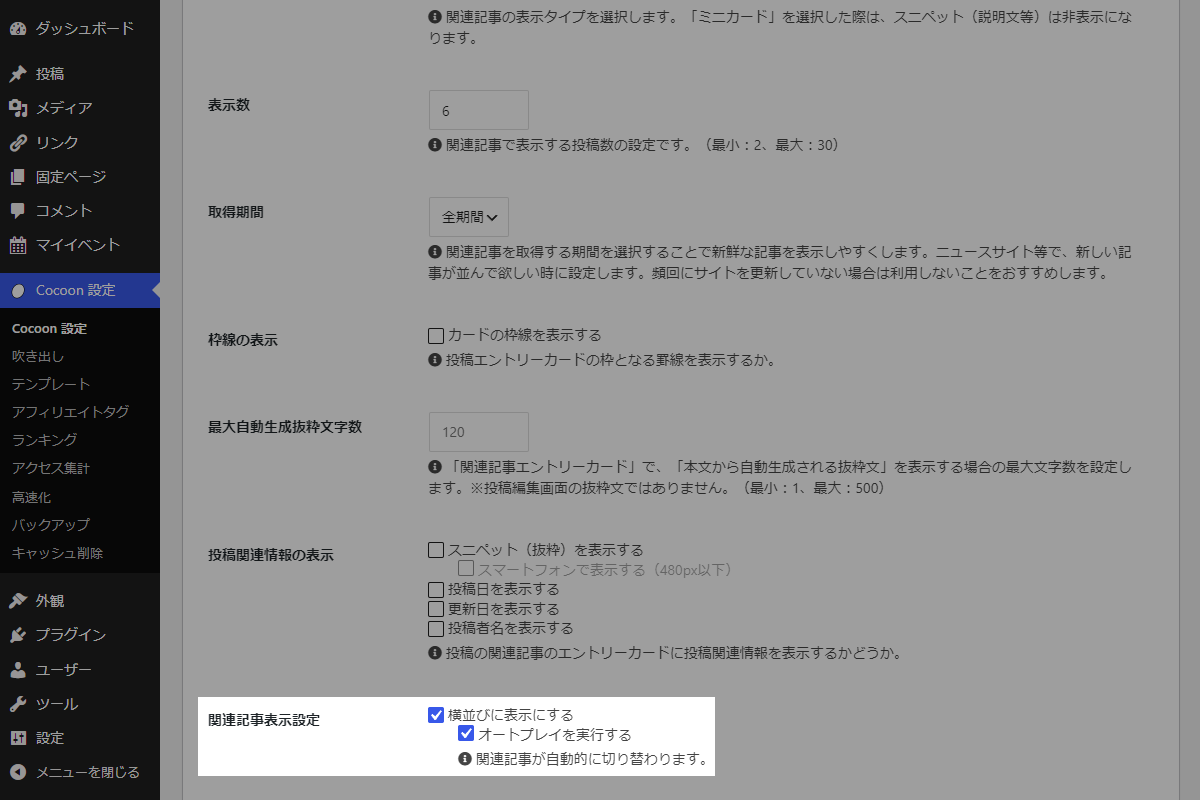
Cocoon設定→投稿→関連記事設定に、独自の設定項目「オートプレイ」を追加します。
完成イメージ
実装手順
以下のコードをfunctions.phpに追加します。
/**
 * 設定値を管理
 *
 * @return array オプション設定の配列
 */
if (!function_exists('my_cocoon_options')):
function my_cocoon_options() {
  return [
    'my_related_horizontal_enable' => ['default' => 0, 'label' => '横並びに表示にする'],
    'my_related_autoplay_enable'   => ['default' => 0, 'label' => 'オートプレイを実行する'],
  ];
}
endif;


/**
 * 設定値を取得
 *
 * @param string $key オプションキー名
 * @return mixed 設定値
 */
if (!function_exists('my_get_cocoon_option')):
function my_get_cocoon_option($key) {
  $options = my_cocoon_options();

  return get_theme_option($key, $options[$key]['default']);
}
endif;


// Cocoon設定値を保存
add_action('cocoon_settings_after_save', function () {
  foreach (array_keys(my_cocoon_options()) as $key) {
    update_theme_option($key);
  }
});


// Cocoon設定にメニューを追加
add_action('admin_menu', function () {
  $page_hook = get_plugin_page_hookname('theme-settings', '');
  if ($page_hook) {
    add_action($page_hook, 'add_single_related_field');
  }
}, 99);


/**
 * Cocoon設定(投稿)のメニュー項目を追加
 *
 * @return void
 */
if (!function_exists('add_single_related_field')):
function add_single_related_field() {
  $options = my_cocoon_options();

  $is_horizontal = (int) my_get_cocoon_option('my_related_horizontal_enable');
  $is_autoplay   = (int) my_get_cocoon_option('my_related_autoplay_enable');

  ob_start();
  ?>
  <tr>
    <th scope="row">
      <label>関連記事表示設定</label>
    </th>
    <td>
      <?php generate_checkbox_tag('my_related_horizontal_enable', $is_horizontal, $options['my_related_horizontal_enable']['label']); ?>
      <div class="indent<?php echo get_not_allowed_form_class($is_horizontal, true); ?>">
        <?php
          generate_checkbox_tag('my_related_autoplay_enable', $is_autoplay, $options['my_related_autoplay_enable']['label']);
          generate_tips_tag('関連記事が自動的に切り替えられます。');
        ?>
      </div>
    </td>
  </tr>
  <?php
  $html_json = json_encode(ob_get_clean());
  ?>
  <script>
  jQuery(function ($) {
    $('#single-relation .form-table tbody').append(<?php echo $html_json; ?>);
  });
  </script>
  <?php
}
endif;


// テンプレート(関連記事全体)を変更
add_filter('cocoon_part__tmp/related-entries', function ($content) {
  if (!my_get_cocoon_option('my_related_horizontal_enable') || is_admin()) {
    return $content;
  }

  global $_IS_SWIPER_ENABLE;
  $_IS_SWIPER_ENABLE = true;

  return preg_replace('/(<div class="related-list)"/', '$1 swiper is-list-horizontal"', $content);
});


// テンプレート(関連記事リスト)を変更
add_filter('cocoon_part__tmp/related-list', function ($content) {
  if (!my_get_cocoon_option('my_related_horizontal_enable') || is_admin()) {
    return $content;
  }

  ob_start();
  ?>
  <div class="swiper-wrapper">
    <?= preg_replace('/(related-entry-card-wrap)/', '$1 swiper-slide', $content); ?>
  </div>
  <div class="swiper-pagination"></div>
  <div class="swiper-button-prev"></div>
  <div class="swiper-button-next"></div>
  <?php
  return ob_get_clean();
});


// テンプレート(カスタムJavaScript)の直後に追加
add_action('cocoon_part_after__tmp/footer-javascript', function () {
  if (!my_get_cocoon_option('my_related_autoplay_enable')) {
    return;
  }

  ?>
  <script>
  if (typeof Swiper !== 'undefined') {
    const relatedSwiper = new Swiper('.related-list', {
      slidesPerView: 'auto',
      spaceBetween: 4,
      loop: true,
      speed: 1000,
      autoplay: {
        delay: 5000,
        disableOnInteraction: false,
      },
      pagination: {
        el: '.swiper-pagination',
        clickable: true,
      },
      navigation: {
        nextEl: '.swiper-button-next',
        prevEl: '.swiper-button-prev',
      },
      breakpoints: {
        481: {
        slidesPerView: 3, // 画面幅481px以上で表示枚数を3枚に設定
        },
      },
    });
  }
  </script>
  <?php
});
さいごに
今回紹介した方法を使えば、本文下の関連記事をSwiper.js を活用してスライダー表示し、オートプレイ機能を追加できます。
これにより、読者が記事をより直感的に選びやすくなり、回遊率の向上が期待できます。