はじめに
以下の内容をスキンで実現します。

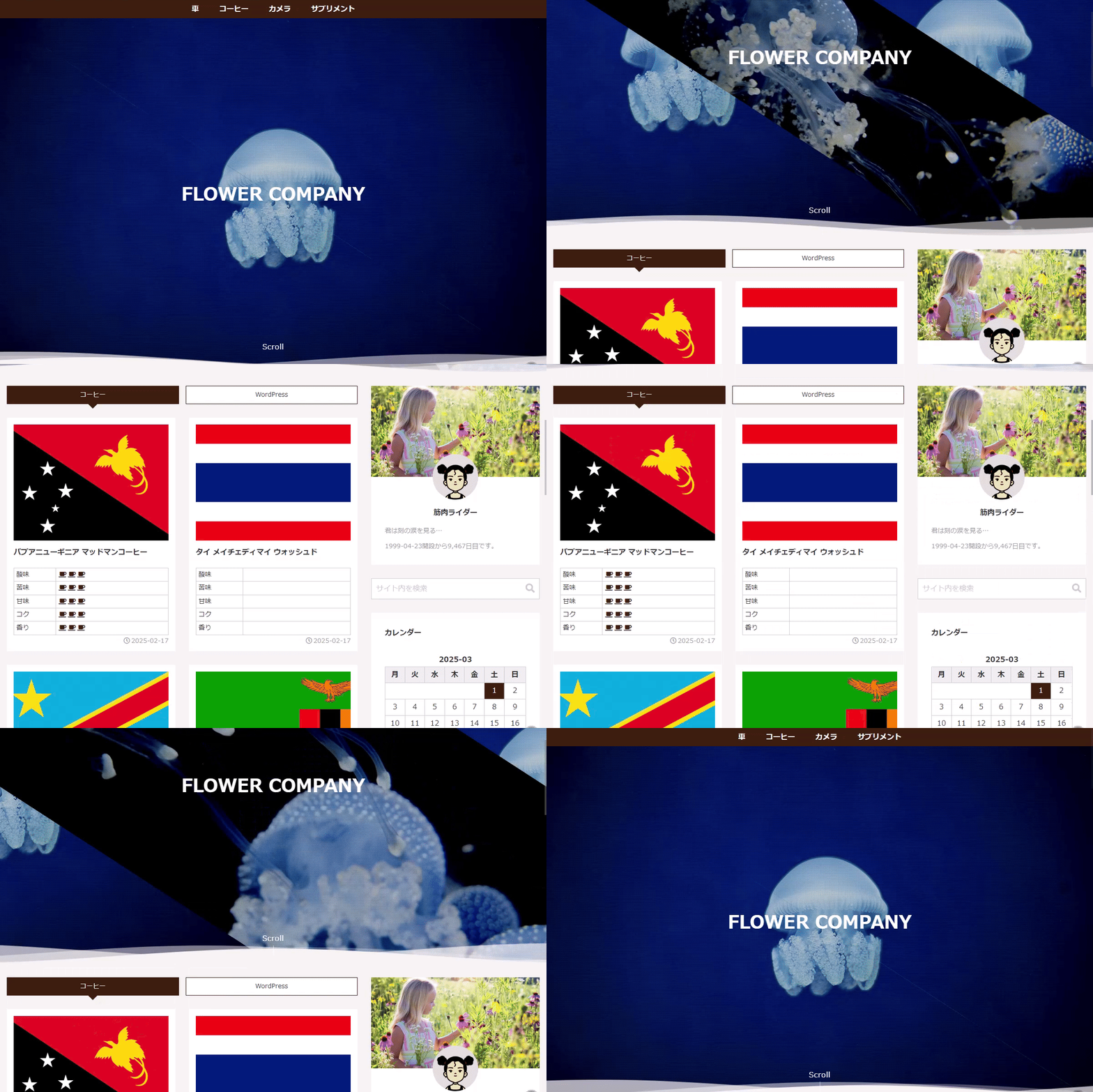
ページスクロールに応じて、メインビジュアルが左右に開くエフェクトを追加します。
この記事では、このスクロールエフェクトを実装する手順について説明します。
完成イメージ
実装手順
以下の手順で実装します。
- ラベルPHPを追加
以下のコードをfunctions.phpに追加します。
add_action('cocoon_part_before__tmp/appeal', function () { if ( get_theme_mod('hvn_header_setting', 'none') === 'none' || !is_front_top_page() || is_singular_page_type_content_only() ) { return; } ?> <div class="hvn-door-wrap"> <div class="hvn-door-l"></div> <div class="hvn-door-r"></div> </div> <script> jQuery(function ($) { $(window).scroll(function () { var x = window.pageYOffset; x = Math.max(x, 0); $('.hvn-door-l').css('left', x * -2 + 'px'); $('.hvn-door-r').css('left', x * 2 + 'px'); }); }); </script> <?php }); - ラベルCSSを追加
以下のコードをstyle.cssに追加します。
.hvn-door-wrap {
  height: var(--height);
  left: 0;
  overflow: clip;
  position: absolute;
  top: var(--ah);
  width: 100%;
}

.hvn-door-l,
.hvn-door-r {
  background-image: url("画像URL");
  background-position: center;
  background-size: cover;
  height: 100%;
  left: 0;
  position: absolute;
  width: 100%;
  z-index: 1;
}

.hvn-door-l {
  clip-path: polygon(0 0, 0% 100%, 100% 100%);
}

.hvn-door-r {
  clip-path: polygon(0 0, 100% 0, 100% 100%);
}
参考:CSSのみでスクロール量に応じてアニメーションする方法
CSSのanimation-timelineを使用すると、JavaScriptなしでスクロール量を表示できます。
これを用いて実装します。

実装手順
以下の手順で実装します。
- ラベルPHPを追加
以下のコードをfunctions.phpに追加します。
add_action('cocoon_part_before__tmp/appeal', function () { if ( get_theme_mod('hvn_header_setting', 'none') === 'none' || !is_front_top_page() || is_singular_page_type_content_only() ) { return; } ?> <div class="hvn-door-wrap"> <div class="hvn-door-l"></div> <div class="hvn-door-r"></div> </div> <?php }); - ラベルCSSを追加
以下のコードをstyle.cssに追加します。
.hvn-door-wrap {
  height: var(--height);
  left: 0;
  overflow: clip;
  pointer-events: none;
  position: absolute;
  top: var(--ah);
  width: 100%;
}

.hvn-door-l,
.hvn-door-r {
  animation: auto linear both;
  animation-range: 0 800px;   /* 0~800pxスクロールで100%開く */
  animation-timeline: scroll(root block);
  background: url("画像URL") center / cover no-repeat;
  height: 100%;
  inset: 0;
  position: absolute;
  width: 100%;
  will-change: transform;
  z-index: 1;
}

.hvn-door-l {
  animation-name: hvn-door-open-l;
  clip-path: polygon(0 0, 0 100%, 100% 100%);
}

.hvn-door-r {
  animation-name: hvn-door-open-r;
  clip-path: polygon(0 0, 100% 0, 100% 100%);
}

@keyframes hvn-door-open-l {
  from {
    transform: translateX(0);
  }
  to {
    transform: translateX(-100%);
  }
}

@keyframes hvn-door-open-r {
  from {
    transform: translateX(0);
  }
  to {
    transform: translateX(100%);
  }
}
さいごに
今回紹介した方法を使えば、スクロール時にメインビジュアルが左右に開く演出を簡単に追加できます。
サイトの第一印象を向上させる効果も期待できます。