
はじめに
プラグイン「Search Exclude」などを使わずに、検索結果から特定の投稿を除外する機能を追加します。
投稿一覧画面に「対象/除外」の切り替えボタンを設置して、投稿ごとに検索結果への含め方を設定できるようにします。
この記事では、この方法について説明します。
完成イメージ
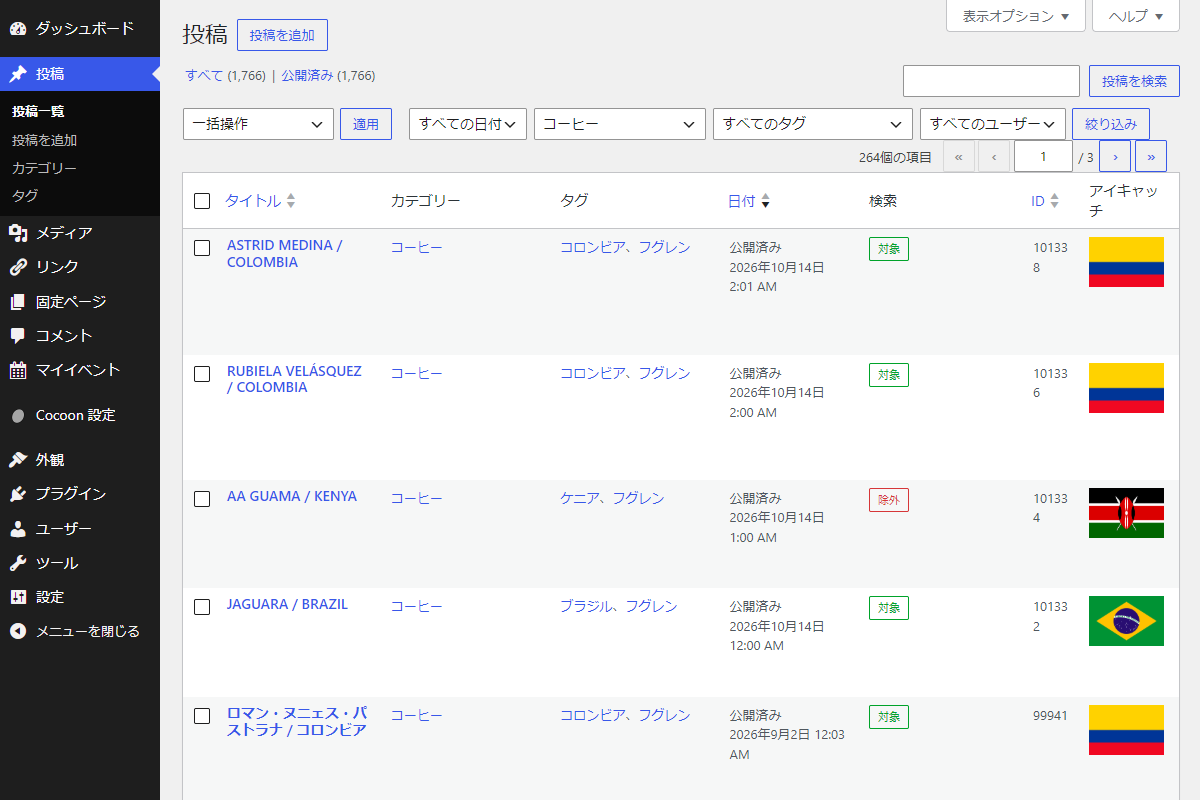
実装手順
以下のコードをfunctions.phpに追加します。
// 管理画面一覧にカラムを追加
add_filter('manage_posts_columns', function ($columns) {
  $columns['exclude_search'] = '検索';

  return $columns;
});


// 管理画面一覧のカラムにデータを表示
add_action('manage_posts_custom_column', function ($column, $post_id) {
  if ($column !== 'exclude_search') {
    return;
  }

  $is_excluded = get_post_meta($post_id, 'my_exclude_search', true);

  $btn_class = ($is_excluded === '1') ? 'exclude-search-btn is-excluded' : 'exclude-search-btn is-included';
  $btn_text  = ($is_excluded === '1') ? '除外' : '対象';

  echo '<button type="button" class="button button-small ' . esc_attr($btn_class) . '" data-post-id="' . esc_attr($post_id) . '">' . esc_html($btn_text) . '</button>';
}, 10, 2);


// 管理画面用JS・CSSを追加
add_action('admin_enqueue_scripts', function ($hook_suffix) {
  if ($hook_suffix !== 'edit.php') {
    return;
  }

  $screen = get_current_screen();
  if (!$screen || $screen->post_type !== 'post') {
    return;
  }

  ob_start();
  ?>
  .exclude-search-btn {
    &.is-included {
      border-color: #00a32a !important;
      color: #00a32a !important;
    }
    &.is-excluded {
      border-color: #d63638 !important;
      color: #d63638 !important;
    }
  }
  <?php
  wp_add_inline_style('wp-admin', ob_get_clean());

  $handle = 'exclude-search-admin-js';
  wp_register_script($handle, '');
  wp_enqueue_script($handle);

  wp_localize_script($handle, 'excludeSearchData', [
    'ajaxurl' => admin_url('admin-ajax.php'),
    'nonce'   => wp_create_nonce('exclude_search_common_nonce')
  ]);

  ob_start();
  ?>
  jQuery(document).ready(function($) {
    $(document).on('click', '.exclude-search-btn', function() {
      var $btn = $(this);
      var postId = $btn.data('post-id');

      $btn.prop('disabled', true);

      $.ajax({
        url: excludeSearchData.ajaxurl,
        type: 'POST',
        data: {
          action: 'toggle_exclude_search_btn',
          post_id: postId,
          nonce: excludeSearchData.nonce
        },
        success: function(response) {
          $btn.prop('disabled', false);
          if (response.success) {
            var isExcluded = response.data.is_excluded;
            if (isExcluded === '1') {
              $btn.text('除外').removeClass('is-included').addClass('is-excluded');
            } else {
              $btn.text('対象').removeClass('is-excluded').addClass('is-included');
            }
          } else {
            alert(response.data || '更新に失敗しました。');
          }
        },
        error: function() {
          $btn.prop('disabled', false);
          alert('通信エラーが発生しました。');
        }
      });
    });
  });
  <?php
  wp_add_inline_script($handle, ob_get_clean());
});

// 4. Ajaxアクションの処理
add_action('wp_ajax_toggle_exclude_search_btn', function() {
  if (!isset($_POST['post_id']) || !isset($_POST['nonce'])) {
    wp_send_json_error('不正なリクエストです。');
  }

  // nonceチェック
  if (!wp_verify_nonce($_POST['nonce'], 'exclude_search_common_nonce')) {
    wp_send_json_error('セキュリティチェックに失敗しました。');
  }

  $post_id = intval($_POST['post_id']);

  // 権限チェック
  if (!current_user_can('edit_post', $post_id)) {
    wp_send_json_error('権限がありません。');
  }

  $current_excluded = get_post_meta($post_id, 'my_exclude_search', true);
  $new_excluded = ($current_excluded === '1') ? '' : '1';

  if ($new_excluded === '1') {
    update_post_meta($post_id, 'my_exclude_search', '1');
  } else {
    delete_post_meta($post_id, 'my_exclude_search');
  }

  wp_send_json_success(['is_excluded' => $new_excluded]);
});


// 投稿クエリの取得条件を変更
add_action('pre_get_posts', function ($query) {
  if (!is_admin() && $query->is_main_query() && $query->is_search()) {
    $meta_query = [
      'relation' => 'OR',
      [
        'key'     => 'my_exclude_search',
        'value'   => '1',
        'compare' => '!=',
      ],
      [
        'key'     => 'my_exclude_search',
        'compare' => 'NOT EXISTS',
      ],
    ];

    $query->set('meta_query', $meta_query);
  }
});
さいごに
今回紹介した方法を使えば、WordPressで特定の投稿を検索結果から除外する機能を簡単に追加できます。
カスタムフィールドを活用し、投稿編集画面にオプションを追加、さらに投稿一覧でその状態を確認できるようにすることで、検索結果をより細かく制御できるようになります。